Apple’s New App Store Subscriptions: Pay Monthly for Yearly Commitments
Apple just quietly rewrote the rules for how you pay for your favourite apps. With the new App Store pay monthly annual plans, you […]
Contributor
Apple just quietly rewrote the rules for how you pay for your favourite apps. With the new App Store pay monthly annual plans, you can now lock in a full year of access to a subscription and still spread those payments out month by month. No lump-sum surprise. No forgotten renewals that drain your bank account in January. It is a small but significant shift that could change how tens of millions of iPhone and iPad users think about software spending, and it puts Apple firmly in step with how modern consumers actually want to pay. For developers, the opportunity is even bigger. The 12-month commitment model unlocks a new tier of subscriber loyalty, users who have effectively promised a full year of engagement. In a market where churn is the silent killer of SaaS revenues, that matters enormously. So what exactly is going on? Let us dig in.
How Do the New 12-Month Commitment Plans Save Users Money?
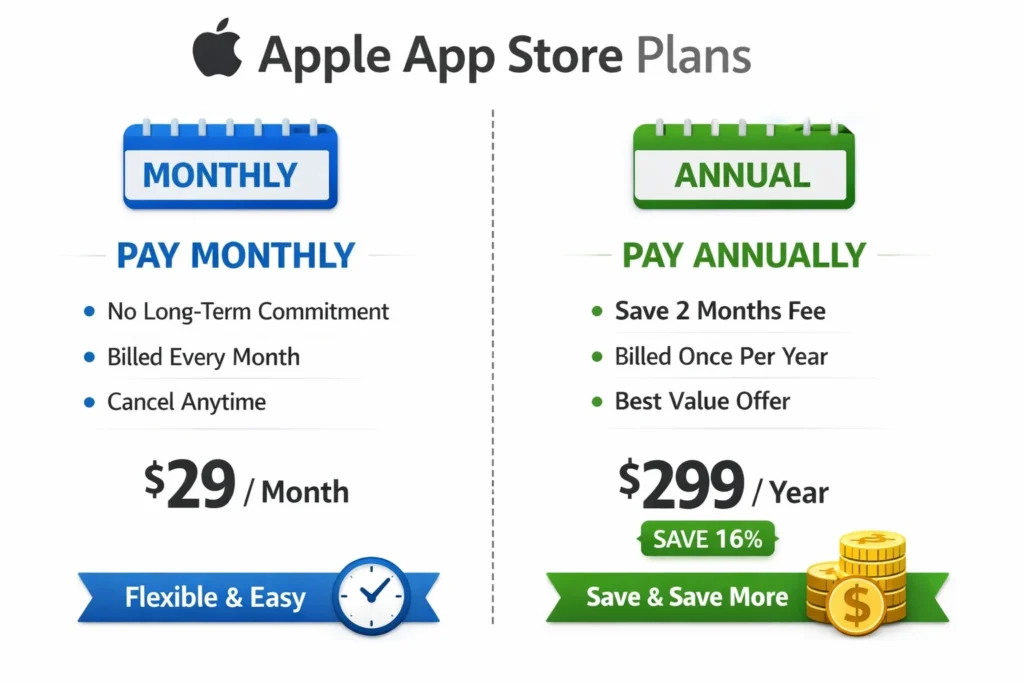
Yes, the new App Store pay monthly annual plans deliver direct cost savings, typically 15–30% compared with a true month-to-month subscription, while letting you pay in twelve equal instalments instead of upfront. Apple announced the subscription framework update in its App Store Connect release notes in late 2024, giving developers the tools to create a new plan type: a monthly billing cadence tied to an annual commitment period.
The maths behind the savings
Here is a simple illustration. Imagine an app that costs $9.99/month or $79.99/year if paid up front. Under the new model, a developer could offer a ‘monthly-annual’ plan at $6.99/month, charged every month for 12 months. The user pays $83.88 total, which is slightly more than the prepaid annual price but considerably less than $119.88 for 12 standalone monthly renewals. The sweet spot, and the deal that converts fence-sitters, is somewhere in between.
According to Statista (2024), global in-app subscription revenue crossed $34 billion on iOS alone, making subscription pricing optimisation one of the highest-leverage decisions any developer can make.
Why users benefit psychologically
Consumer research from Baymard Institute consistently shows that large upfront payments create purchase anxiety, even when the per-unit cost is lower. Spreading payments eliminates that friction. Users feel the ‘monthly’ familiarity of Netflix or Spotify while still committing to the service that sustains the developer.
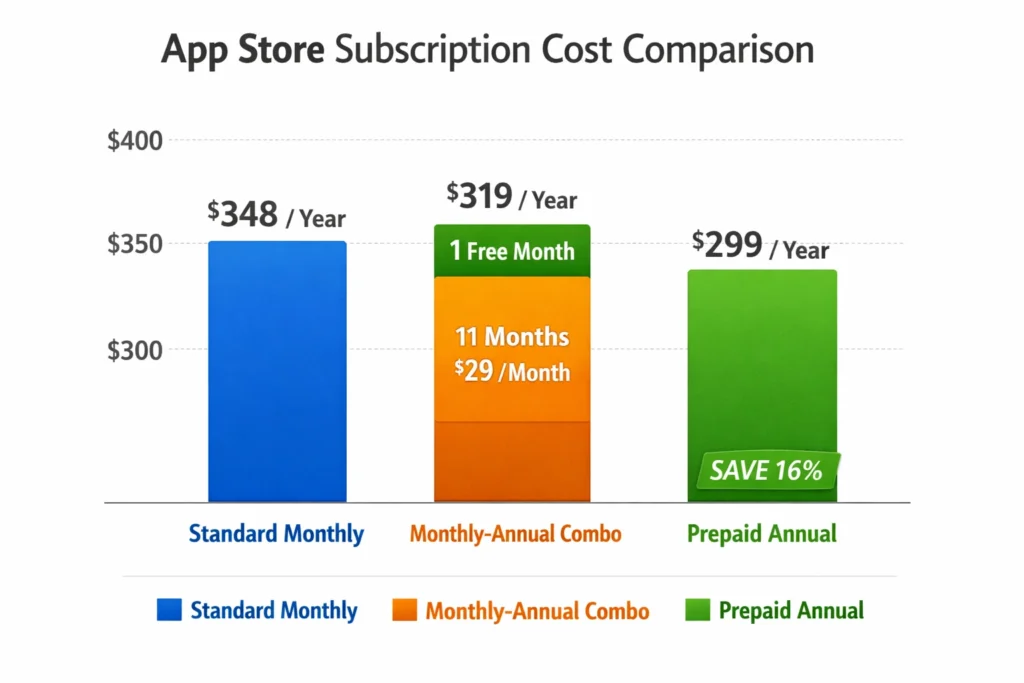
Key savings at a glance:
- Monthly-Annual plans typically cost 20–30% less than standard monthly billing
- Users avoid a large upfront annual charge while still benefiting from discounted pricing
- Auto-renews annually (not monthly) unless cancelled before the commitment period ends
- Apple keeps the same 15% or 30% commission tier, so net savings go entirely to users
- Available on iOS 17+, iPadOS 17+, macOS 14+, tvOS 17+, and watchOS 10+
What Happens If You Cancel an Annual Subscription Early?
If you cancel an App Store pay monthly annual plan mid-term, you keep access to the app until the end of your current billing month, but you are not refunded for any months already paid. Think of it exactly like a mobile phone contract: cancel in month seven, enjoy access through that month, but the remaining five months’ worth of locked-in pricing advantage disappears. Apple does not pro-rate refunds for monthly payments within an annual commitment.
The refund exception
Apple’s standard refund policy still applies. If you cancel within 48 hours of the initial subscription charge and have not meaningfully used the app, you can request a refund via reportaproblem.apple.com. Beyond that window, the standard ‘no refund on committed subscription’ rule takes over.
What does 'early cancellation' actually mean for your wallet?
Critically, early cancellation does not trigger an early-termination fee. You simply lose the benefit of the discounted monthly-annual rate from the following billing cycle and access stops at month-end. There is no penalty, just the end of the deal.
Cancellation summary at a glance:
- Cancel anytime — no early-termination penalty
- Access continues until the end of the current billing month
- No refunds for months already billed within the annual term
- Standard 48-hour refund window applies for the very first payment
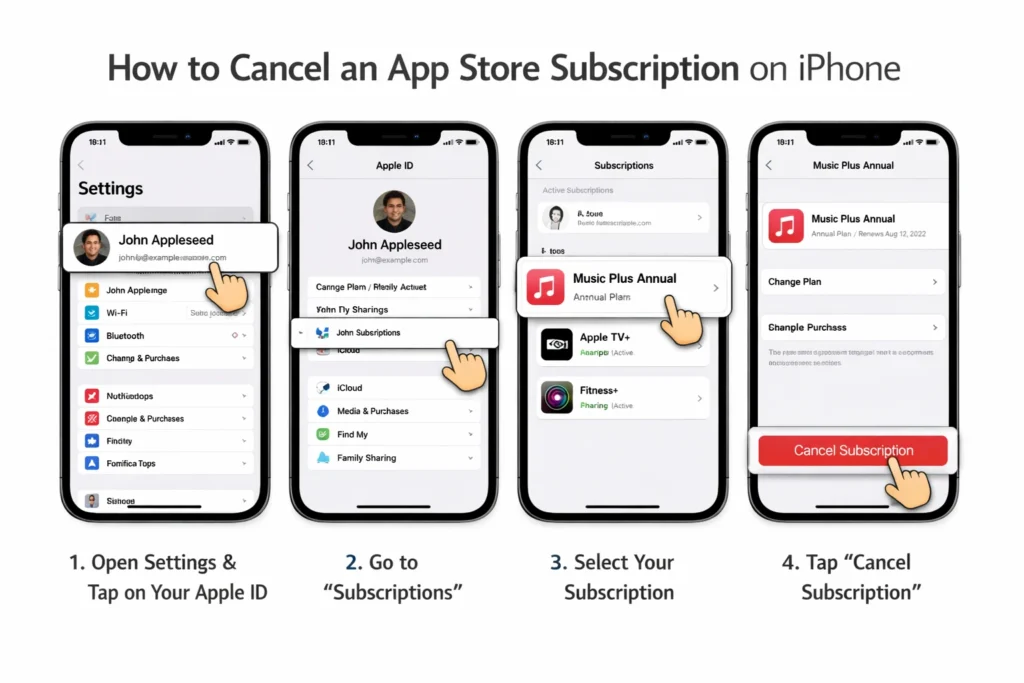
- To cancel: Settings > Apple ID > Subscriptions > [App Name] > Cancel
Comparing 'Standard Monthly' vs. 'Monthly-Annual' Pricing on iOS
A standard monthly subscription on iOS renews every 30 days at the same price, with no commitment, cancel anytime and pay only for what you use. A monthly-annual plan on iOS charges the same monthly cadence but locks you into 12 billing cycles at a discounted per-month rate. The distinction matters because it changes not just the price, but the entire psychological contract between user and app.
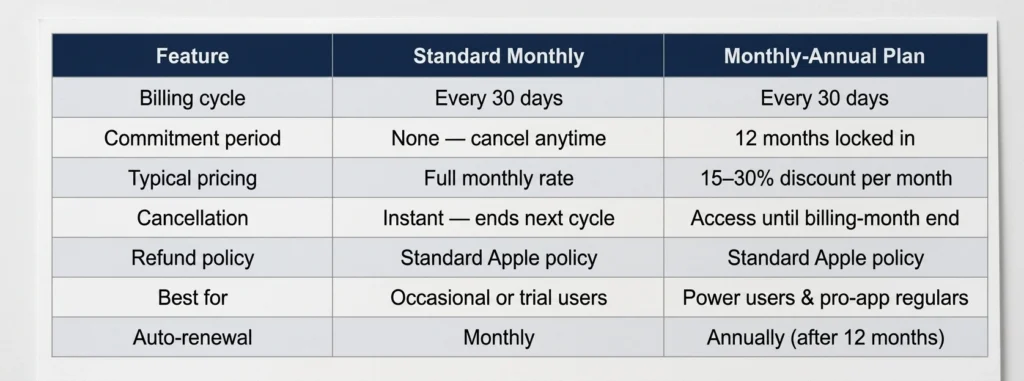
Which plan type should you choose?
If you use an app daily, productivity suites, creative tools, fitness trackers, the monthly-annual model is almost certainly the better deal. The per-month cost is lower, and since you were going to keep the subscription anyway, you’re effectively getting two to four months free. If you’re testing an app or only need it seasonally, stick with standard monthly and preserve flexibility.
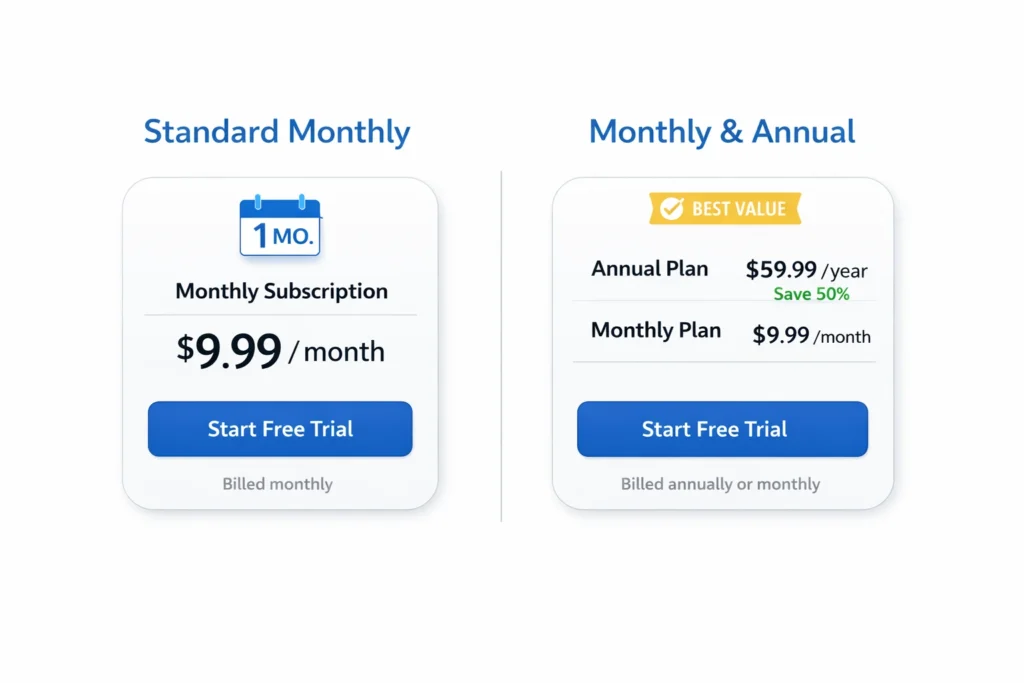
How Developers Can Implement the New Subscription Model
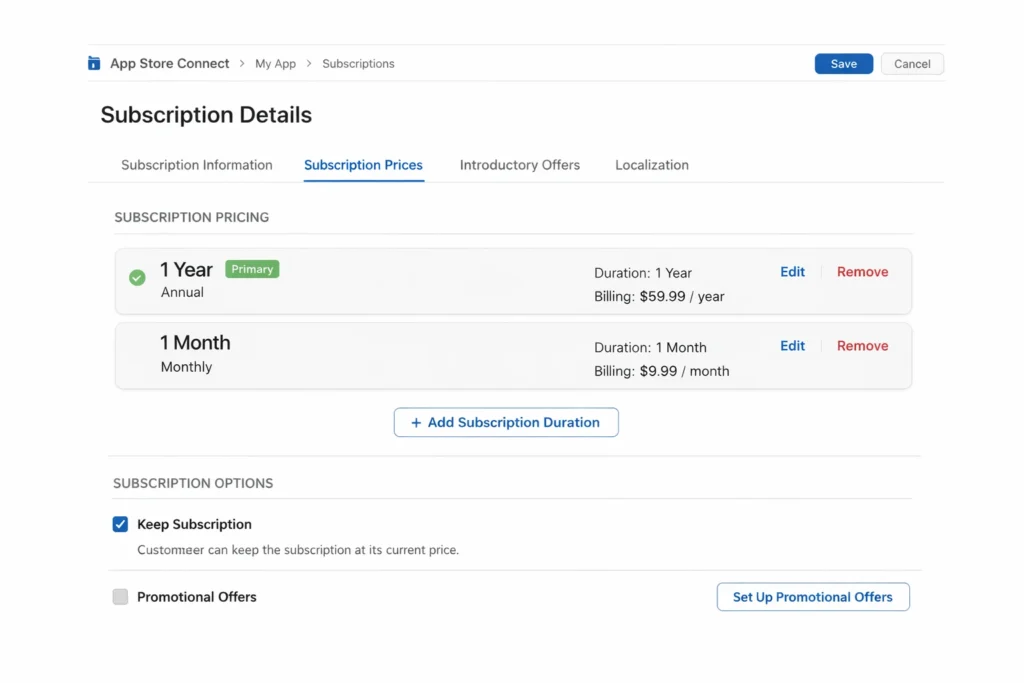
Developers implement the monthly-annual App Store subscription model through App Store Connect by creating a new subscription product, selecting a 12-month duration, enabling monthly billing, and configuring a discounted price point relative to their standard monthly tier. Apple introduced the necessary API hooks in StoreKit 2 (iOS 15+), but the commitment-period monthly billing specifically became configurable for all developers in the App Store Connect updates shipped alongside iOS 17.
Step-by-step: creating a monthly-annual subscription
- Log in to App Store Connect and navigate to your app’s page
- Select Features > In-App Purchases > Subscriptions
- Create a new subscription group or add a new tier to an existing group
- Set Duration to 1 Year and enable the Monthly Billing toggle
- Configure pricing — Apple recommends pricing 20–30% below your standard monthly tier
- Set introductory offer (optional) — e.g., first month free or discounted
- Submit for App Review — Apple will verify pricing coherence within the group
StoreKit 2 integration
On the code side, StoreKit 2 in Swift handles monthly-annual products identically to other subscription types. The Product.SubscriptionInfo.RenewalInfo object surfaces the commitment period so your app can surface accurate renewal dates and cancellation messaging to users. Use Transaction.currentEntitlements to check active subscriptions in real time, no server-side receipt validation required.
Pricing strategy tips for developers
- Anchor your monthly-annual price at roughly 65–75% of your standard monthly rate
- Offer an introductory price (e.g. first 3 months at 50% off) to drive initial conversion
- Use App Store promotional offers to win back lapsed subscribers
- Test price points with different localised markets — emerging markets often see higher conversion at lower absolute prices
- Monitor churn in RevenueCat or Adapty dashboards post-launch
Developer data point: According to a 2024 RevenueCat State of Subscription Apps report, apps that offer annual plans (of any billing type) see median LTV 2.5x higher than those that only offer monthly subscriptions. Adding a monthly payment option for that annual commitment is likely to push conversion rates higher still.
Is the 12-Month Commitment Model Better for Pro Apps?
Yes — the 12-month commitment model is particularly well-suited to professional and power-user applications, where users derive consistent, high-value utility from the software and are unlikely to cancel if given a manageable monthly payment. Pro apps in categories like video editing, music production, design, data analysis, and enterprise productivity stand to benefit most from this subscription structure.
Why pro apps are the natural home for this model
Professional users have a fundamentally different relationship with their software. A video editor using LumaFusion, a musician using GarageBand Pro integrations, or a business analyst using Datadog on iOS all need their apps month in, month out, they just may balk at a $149 annual charge landing in one hit. The monthly-annual plan converts that ‘annual user who doesn’t want to pay annually’ into a committed subscriber. It’s genuinely elegant.
The consumer app opportunity
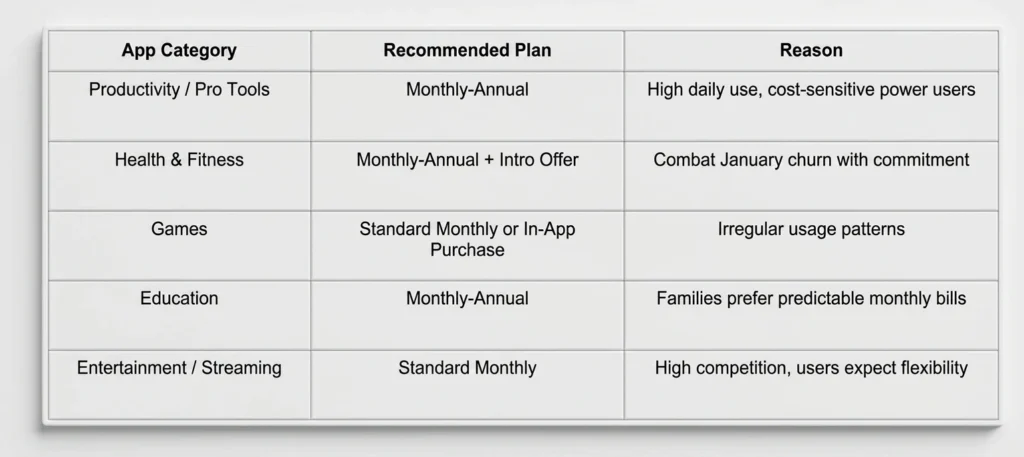
That said, consumer apps shouldn’t sleep on this either. Fitness apps, language learning platforms (think Duolingo Plus), and meditation apps all see seasonal surges in sign-ups — January gym-goers, for instance. Converting those users to a 12-month commitment at a palatable monthly rate before their motivation dips is a legitimate retention strategy.
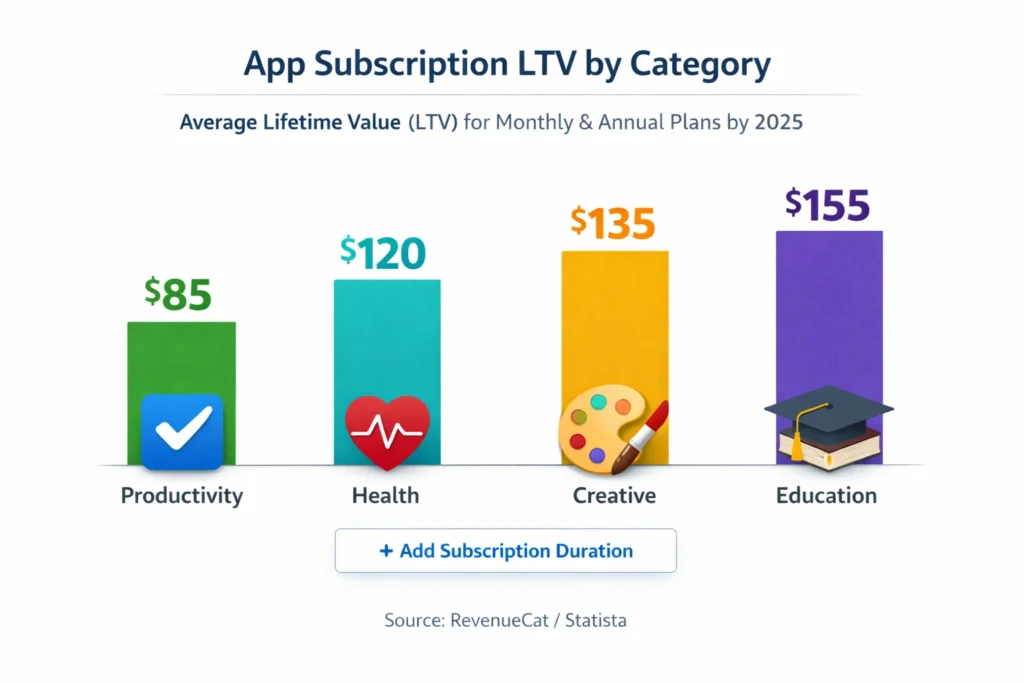
Industry data: who benefits most?
- Productivity apps: highest LTV and lowest churn — ideal candidates
- Health & Fitness: high sign-up spikes but high early churn — monthly-annual could anchor users
- Creative tools: users invest time in learning the app, raising switching costs
- Education: parents and students prefer predictable monthly costs over annual lump sums
- Business/Finance: enterprise IT buyers may actually prefer annual commitment for procurement
Conclusion
Apple’s new App Store pay monthly annual plans are a win for virtually everyone in the ecosystem. Users get the pricing benefits of an annual subscription without the shock of a large upfront payment. Developers gain a new conversion path that should meaningfully reduce churn among their most valuable user segments. And Apple itself gets a healthier, stickier subscription economy built on its platform. Whether you are a developer mapping out your subscription strategy for the rest of 2026 or a power user deciding whether to upgrade that productivity app to its pro tier, the 12-month commitment model deserves serious consideration. The maths make sense. The user experience has been smoothed. And frankly, it is about time the App Store caught up with how people actually want to pay.
FAQs
1. What is Apple’s new subscription option?
Apple now allows users to commit to a 12-month App Store subscription but pay in smaller monthly installments.
2. Is the monthly-annual plan cheaper?
Yes, it is typically cheaper than a standard monthly plan but more expensive than a one-time annual payment.
3. Can I cancel the 12-month commitment early?
No, by choosing this plan, you agree to pay for the full year in monthly increments.
4. Which apps have the pay-monthly annual option?
It is currently rolling out to major creative and productivity apps in the iOS 26.5 beta.
5. How do I sign up for the installment plan?
Look for the “Yearly (Pay Monthly)” option in the subscription menu of supported apps.
6. Do I need a credit card for App Store installments?
It uses your standard App Store payment method (Apple ID balance, credit card, or Apple Pay).

Swathi is a contributor at GizStreet with a master’s degree in science and a strong background in technical writing and product review. She covers gadgets, software, and consumer tech, with a focus on breaking down complex products into clear, practical takeaways for readers.
Share this story
Related Articles
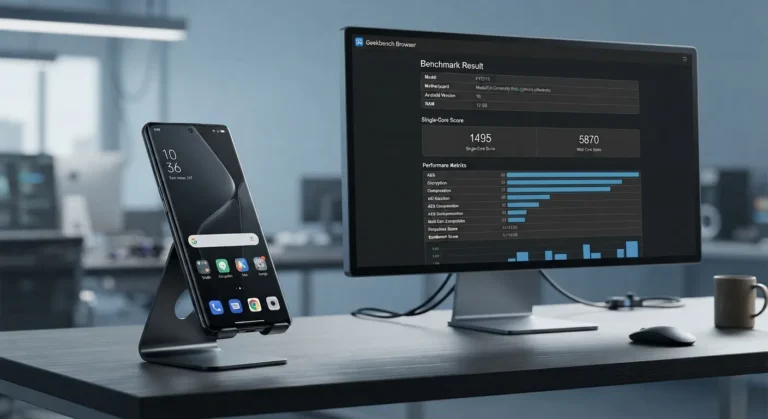
Oppo A7 Pro Max Surfaces in Geekbench Listing, but Official Details Are Still Missing
The Oppo A7 Pro Max has surfaced in a Geekbench listing, revealing early hardware details. Here's what has been verified and what remains unconfirmed ahead of any official announcement.

Apple’s Reported M2 Extreme and M3 Extreme Chips: What We Know, What We Don’t, and Why It Matters
Apple's reported M2 Extreme and M3 Extreme chips remain unconfirmed. Learn what Apple has officially revealed about M2 Ultra and UltraFusion technology.

Vivo X500 Ultra Leak Reveals Three 200MP Periscope Camera Sensors Under Consideration
Vivo X500 Ultra is reportedly being tested with three 200MP periscope camera sensors as the company balances zoom performance and smartphone design.
Comments (0)