Gaming Computer: Complete Guide to choosing the Best Gaming PC in 2026
Finding the best gaming computer in 2026 means balancing raw power with future-proof technology. Unlike a standard desktop, a gaming PC is a high-performance […]
Contributor
Finding the best gaming computer in 2026 means balancing raw power with future-proof technology. Unlike a standard desktop, a gaming PC is a high-performance machine specifically engineered to handle resource-heavy applications, featuring dedicated graphics cards, high-speed processors, and advanced cooling systems.
What Is a Gaming Computer?
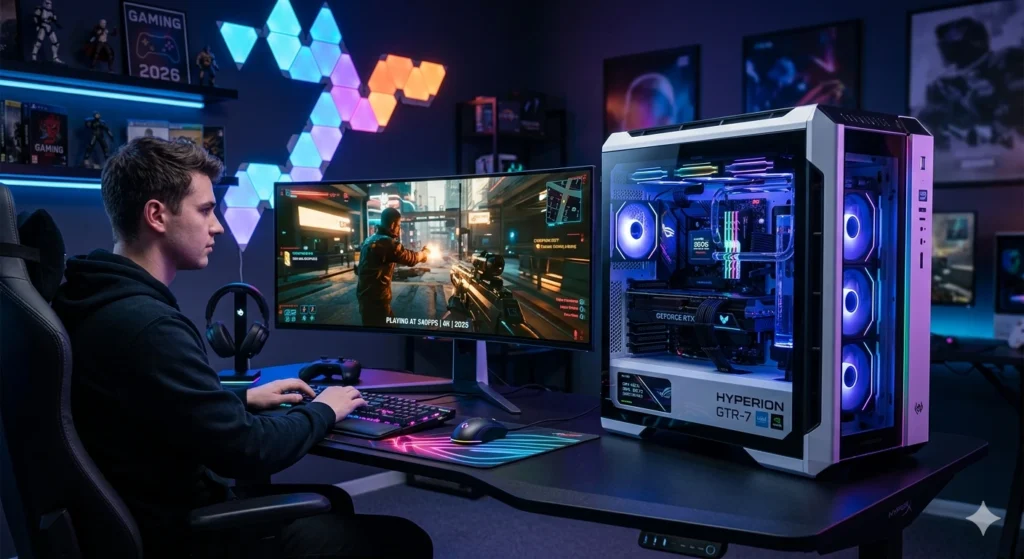
At its core, the gaming computer definition refers to a high-performance desktop or laptop specifically designed to run demanding video games at high resolutions and frame rates. While a standard office PC is built for spreadsheets and web browsing, a gaming computer is an enthusiast-grade machine engineered for power, speed, and visual fidelity.
Key Differences from Normal PCs
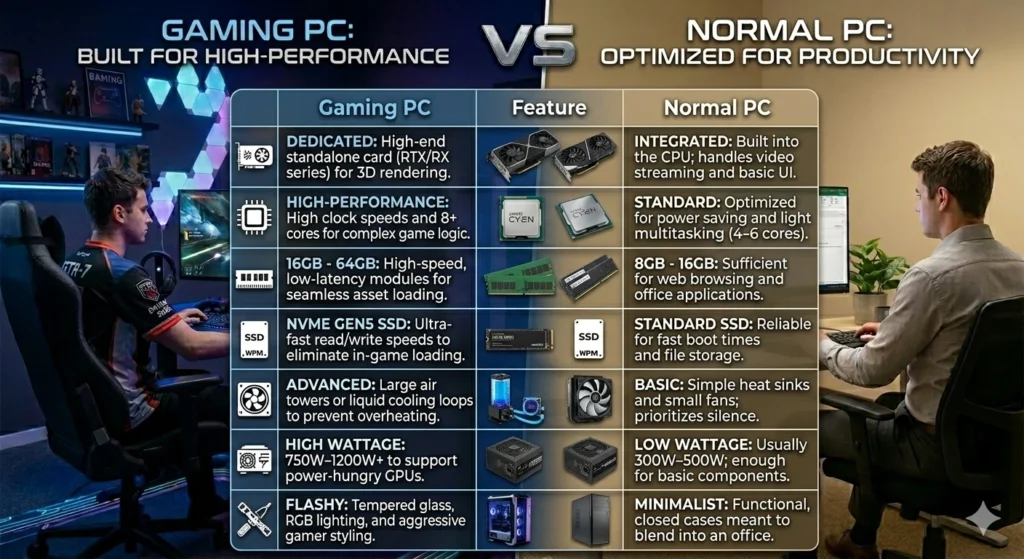
- Dedicated GPU: While normal PCs use the processor for basic visuals, gaming systems feature a standalone Graphics Processing Unit (GPU) to render 3D environments.
- Advanced Cooling: Gaming generates intense heat. These systems use large heatsinks, multiple fans, or liquid cooling loops to prevent thermal throttling.
- High-Speed Memory: They utilize low-latency RAM and NVMe SSDs to eliminate loading screens and stuttering.
- Customization & Aesthetics: Most gaming PCs feature gamer aesthetics, such as transparent side panels and customizable RGB lighting.
Gaming Computer vs Normal PC: Key Differences
When choosing between a gaming pc vs normal pc, the primary distinction lies in specialized power versus general utility. While a regular computer is built for efficiency and cost-effectiveness in daily tasks, the difference between gaming computer and regular computer architecture is designed to sustain heavy graphical and processing loads for hours at a time.
Gaming Computer vs. Normal PC
The Performance Gap
While a normal PC can technically open most software, it will often stutter or fail to launch modern titles because it lacks a dedicated video memory (VRAM) buffer. A gaming computer bridges this gap, allowing for a stutter-free experience even when running high-resolution textures and complex physics simulations simultaneously.
Essential Components of a Gaming Computer
Building a high-performance system requires a strategic selection of parts of a gaming computer that work in harmony. You must look beyond basic functionality and focus on components that can handle the massive data throughput required by 2026’s triple-A titles.
The Core Gaming PC Components
- Graphics Processing Unit (GPU): Often called the video card, this is the most critical of all gaming pc components. It handles every visual element, from ray-traced reflections to high-resolution textures.
- Central Processing Unit (CPU): The brain of the operation. A modern gaming CPU manages game physics, AI logic, and background tasks without bottlenecking the GPU.
- Motherboard: The nervous system that connects all your parts. For a 2026 build, ensure it supports PCIe 5.0 and DDR5 memory for maximum bandwidth.
- RAM (Memory): High-speed DDR5 RAM is essential for quick data access. 32GB is the sweet spot for gaming while running apps like Discord or streaming software in the background.
- Storage (SSD): Forget traditional hard drives. An NVMe M.2 SSD is a mandatory part of a gaming computer today, drastically reducing load times and enabling Direct Storage technology.
- Power Supply Unit (PSU): You need a reliable, high-wattage PSU (80+ Gold rated) to provide stable power to your power-hungry components.
- Cooling System: Whether you choose high-end air coolers or an All-In-One (AIO) liquid cooler, keeping temperatures low is vital for maintaining peak performance.
- The Case (Chassis): Beyond aesthetics, the case must provide excellent airflow and enough physical space for modern, oversized graphics cards.
By carefully selecting these gaming pc components, you ensure your system isn’t just powerful today, but remains relevant for years to come.
CPU (Processor)
Choosing the best CPU for gaming PC setups requires a focus on per-core performance and high cache counts. As the brain of your system, the gaming processor handles everything from character AI and physics to complex world-building logic that a graphics card simply can’t process alone.
The 2026 Gaming Processor Guide
To find the right balance between price and performance, consider these three tiers based on current benchmarks:
- The High-End Champion (Enthusiast): Look for processors with 3D V-Cache technology. These CPUs feature an extra layer of memory that drastically reduces latency, making them the best CPU for gaming PC enthusiasts who want to push 240Hz+ refresh rates in competitive titles.
- The Mid-Range Sweet Spot (Mainstream): An 8-core, 16-thread processor remains the gold standard. It provides enough headroom to play the latest AAA games while running background apps like Discord, Spotify, or streaming software without a performance hit.
- The Budget Performer (Entry-Level): Even modern 6-core processors are incredibly capable in 2026. These are perfect for 1080p or 1440p gaming when paired with a solid mid-range GPU.
GPU (Graphics Card)
The graphics card is the single most important component for any high-performance build, acting as the engine that renders every frame of your favourite worlds. Choosing the best GPU for gaming PC setups requires balancing raw pixel-pushing power with modern AI features like frame generation and real-time ray tracing.
The 2026 Gaming Graphics Card Guide
The market is defined by three distinct performance tiers, each catering to different monitor resolutions and refresh rates:
- The 4K Ultra Enthusiast: If you want to play at Extreme settings with full Ray Tracing (Path Tracing), you’ll need a flagship gaming graphics card with at least 24GB of VRAM. These cards are designed to handle the massive texture loads of next-gen open-world titles.
- The 1440p Sweet Spot: This remains the most popular category. The best GPU for gaming PC builds in this range offers high frame rates (144Hz+) at QHD resolution, utilizing AI-upscaling to maintain clarity without sacrificing performance.
- The 1080p Budget King: For competitive eSports titles like Valorant or Apex Legends, look for cards with 8GB to 12GB of VRAM. These provide consistent, stutter-free performance at a much lower price point.
RAM (Memory)
The memory standards have shifted, making high-speed DDR5 the baseline for any modern build. Determining how much RAM for gaming PC setups depends entirely on your multitasking habits and the specific genres you play, as modern engines now stream massive amounts of data in real-time.
2026 Gaming PC RAM Requirements
To ensure your system remains stutter-free, follow these updated density guidelines:
- 16GB (Entry-Level): This is now the absolute minimum. While it handles most eSports titles well, you may experience hitching’s in massive open-world games or if you keep too many browser tabs open while gaming.
- 32GB (The New Standard): For the vast majority of players, 32GB is the gaming PC RAM requirement for a set and forget experience. It provides enough headroom for high-fidelity textures in AAA titles while running background apps like Discord, Spotify, and game launchers simultaneously.
- 64GB+ (Enthusiast & Streaming): If you are a professional content creator, heavy modder (especially for simulation games like Cities: Skylines II or Microsoft Flight Simulator), or if you frequently edit 4K video on the same machine, 64GB is a worthwhile investment.
Speed vs. Latency
When asking how much RAM for gaming PC builds you need, don’t overlook speed. In 2026, look for frequencies of 6000MHz to 7200MHz. Higher speeds allow your CPU to access data faster, which directly translates to higher minimum frame rates and a smoother overall experience.
Storage (SSD vs HDD)
The debate over SSD vs HDD for gaming has effectively ended, as modern game engines now require high-speed data streaming to function. Choosing the best storage for gaming pc builds now focuses on NVMe technology, which has become the baseline for a stutter-free experience.
SSD vs HDD for Gaming: The 2026 Reality
- NVMe SSD (The Standard): These drives plug directly into your motherboard. Gen5 NVMe SSDs offer speeds upwards of 10,000 MB/s, which is essential for Direct Storage technology. This allows the GPU to pull data directly from the drive, virtually eliminating loading screens.
- SATA SSD (The Budget Alternative): While slower than NVMe, these are still significantly faster than any hard drive. They are excellent for a secondary drive to store older titles or a massive backlog of indie games.
- HDD (The Archive Only): Hard Disk Drives are no longer recommended for running modern games. Their slow mechanical platters cause texture pop-in and system lag. Today, the only role for an HDD is for bulk storage of photos, videos, or documents.
Finding the Best Storage for Gaming PC Setups
When configuring, follow these storage guidelines for optimal performance:
- Capacity: Aim for a 2TB NVMe SSD as your primary drive. With many AAA titles exceeding 150GB, a 1TB drive fills up surprisingly fast.
- Speed Tiers: For a high-end build, a PCIe Gen5 drive ensures you are ready for future software updates. For a balanced build, a PCIe Gen4 drive still offers incredible performance at a better price point.
- Durability: Look for drives with high TBW (Terabytes Written) ratings, ensuring your drive lasts through years of game installs and updates.
The best storage for gaming pc builds is an NVMe SSD. It isn’t just about faster boot times anymore it’s a fundamental gaming pc requirement for playing modern, open-world titles without technical hitches.
Cooling System
Maintaining a high-performance gaming pc cooling system is critical, as modern CPUs and GPUs generate more heat than ever to deliver peak frame rates. Without proper thermal management, your components will throttle, intentionally slowing down to prevent permanent damage.
The Great Debate: Air vs Liquid Cooling
When deciding between air vs liquid cooling for your 2026 build, the choice often comes down to your processor’s power draw and your aesthetic preferences.
- Air Cooling (The Reliable Workhorse):
- How it works: Uses a large metal heatsink and high-static-pressure fans to pull heat away from the CPU.
- Pros: Highly durable with fewer points of failure (no pumps or leaks), easier to install, and often more cost-effective.
- Best for: Mid-range gaming PCs and users who prefer a set it and forget it approach.
- Liquid Cooling (The Thermal Powerhouse):
- How it works: An All-In-One (AIO) or custom loop circulates coolant through a block on the CPU to a radiator, where fans dissipate the heat.
- Pros: Superior thermal overhead for high-end enthusiast CPUs, quieter operation under heavy loads, and a sleek, modern aesthetic with RGB integration.
- Best for: High-end gaming pc cooling systems where overclocking or 4K gaming is the priority.
System-Wide Airflow
A great gaming pc cooling system isn’t just about the CPU. You must also consider your case’s airflow:
- Intake Fans:Front or bottom fans pull cool air into the chassis.
- Exhaust Fans:Rear or top fans push hot air out.
- Positive Pressure:Having slightly more intake than exhaust helps prevent dust buildup inside the case.
Whether you choose air vs liquid cooling, ensuring your components stay below 80°C during intense sessions will extend the lifespan of your entire system.
Types of Gaming Computers
Choosing the right types of gaming pc depends on your lifestyle, available space, and how much you value portability versus raw, upgradable power. In 2026, the market has expanded beyond the traditional tower to include highly specialized form factors for every kind of player.
The Main Types of Gaming PC
Understanding the types of gaming pc available helps you narrow down which system fits your environment:
- Desktop Gaming PCs (The Gold Standard)
- Gaming Laptops (The Portable Powerhouse)
- Small Form Factor (SFF) PCs
- Handheld Gaming PCs
- All-in-One (AiO) Gaming PCs
Prebuilt Gaming PC
For many players in 2026, a prebuilt gaming pc is the most efficient route to high-end performance without the complexity of manual assembly. A readymade gaming computer comes fully assembled, tested, and pre-configured with an operating system, allowing you to go from unboxing to gaming in minutes.
While custom building offers granular control, the prebuilt gaming pc market has evolved to offer several distinct advantages:
- Plug-and-Play Simplicity: A readymade gaming computer eliminates the risk of component incompatibility or assembly errors. Every part is guaranteed to work together right out of the box.
- Unified Warranty: If a component fails, you deal with a single manufacturer for the entire system rather than troubleshooting individual parts from different brands.
- Aesthetic Consistency: Professional builders often use specialized cabling and lighting controllers to ensure the interior of your prebuilt gaming pc looks as good as it performs.
- Availability: During hardware shortages, major system integrators often have priority access to the latest GPUs and CPUs that might be sold out for individual buyers.
Not every readymade gaming computer is built equal. To ensure you’re getting the best value, look for these three things:
- Standardized Parts:Ensure the builder uses off-the-shelf components (like standard motherboards and power supplies) rather than proprietary parts that are difficult to upgrade later.
- Cooling & Airflow:Some budget prebuilt gaming pc models use restrictive cases. Look for Mesh front panels or liquid cooling to maintain peak speeds.
- Bloatware:Check if the manufacturer installs unnecessary background software, which can slow down your system’s performance.
Custom Gaming PC
For enthusiasts who want total control over every specification, a custom gaming pc build is the ultimate way to experience modern gaming. When you build your own gaming pc, you aren’t just putting parts together; you are optimizing a machine to match your specific performance goals, whether that is competitive 1080p gaming or cinematic 4K ray tracing.
Choosing to build your own gaming pc offers several advantages that pre-built systems often miss:
- Maximum Value: You can allocate your budget where it matters most for example, spending more on a high-tier GPU and saving on aesthetics.
- No Proprietary Parts: Unlike some mass-produced systems, a custom gaming pc build uses standardized components, making it much easier to repair or upgrade in the future.
- Zero Bloatware: You control exactly what software is installed, ensuring your operating system is lean, fast, and dedicated entirely to gaming performance.
- Personalized Aesthetics: From custom liquid cooling loops to specific colour-themed components, your PC becomes a unique reflection of your style.
If you are ready to build your own gaming pc, the process typically follows this workflow:
- Define Your Goal:Determine if you are targeting 1440p high-refresh-rate gaming or professional-grade 4K content creation.
- Part Selection:Use compatibility tools to ensure your CPU, Motherboard, and RAM are perfectly matched for 2026 standards (like DDR5 and PCIe 5.0).
- Preparation:Gather your tools usually just a magnetic Phillips-head screwdriver and a clean, anti-static workspace.
- The Build:Install the CPU and RAM into the motherboard first, then mount it in the case before connecting the power supply and GPU.
Prebuilt vs Custom Gaming Computer: Which Is Better?
Choosing between a prebuilt vs custom gaming pc in 2026 often comes down to one question: do you value your time or your technical control? While both paths lead to a high-performance machine, the decision of whether you should build or buy gaming pc depends on your comfort level with hardware and your long-term goals.
Prebuilt Gaming PC (The Convenience Path)
A prebuilt is a ready-made system from brands like HP, Dell (Alienware), or boutique integrators.
- Pros: It works immediately out of the box, includes a single professional warranty for the whole system, and often features professional cable management.
- Cons: You may pay a builder’s fee (markup), and some mass-market models use lower-quality power supplies or proprietary motherboards that are hard to upgrade later.
- Best for: Beginners or busy professionals who want a guaranteed working machine with technical support.
Custom Gaming PC (The Enthusiast Path)
This involves selecting every individual part and assembling the computer yourself.
- Pros: You get the best performance by avoiding assembly fees. Every part is high-quality, and the machine is 100% upgradable. You also gain a deep understanding of how your PC works.
- Cons: It requires several hours of research and assembly. If a part doesn’t work, you have to troubleshoot and return that specific component yourself.
- Best for: Hobbyists who want a personalized look and the most powerful hardware for their budget.
The Verdict: Should I Build or Buy Gaming PC?
If you are nervous about handling expensive electronics or need a PC for work/play immediately, buy a prebuilt. However, if you want a machine that grows with you and offers the best value in the 2026 market, you should build your own.
Gaming Laptops vs Gaming Desktops
When deciding between a gaming laptop vs desktop, the choice ultimately comes down to whether you prioritize portability or power and longevity. While the performance gap has narrowed significantly, each form factor still serves a distinct type of player.
To determine which is better for gaming for your specific needs, consider these key factors:
- Performance & Thermals:
- Desktop: Features full-sized components with massive cooling systems. This allows for higher boost speeds and sustained peak performance without thermal throttling.
- Laptop: Uses mobile versions of GPUs and CPUs. While powerful, they are constrained by heat and power limits, often performing about 10–20% slower than their desktop counterparts.
- Portability & Convenience:
- Desktop: Stationary. It requires a dedicated desk, monitor, and peripherals.
- Laptop: The ultimate all-in-one solution. With an integrated screen, keyboard, and battery, you can take your entire library to a friend’s house or a cafe.
- Upgradability & Lifespan:
- Desktop: Highly modular. You can swap out a GPU or CPU five years from now to keep up with new games.
- Laptop: Limited. You can usually only upgrade the RAM and Storage. Once the GPU becomes obsolete, you typically need to buy an entirely new machine.
- Cost Efficiency:
- Desktop: Offers the best performance-per-rupee. You aren’t paying for miniaturized parts or a built-in display.
- Laptop: More expensive upfront because you are paying for the engineering required to fit high-end tech into a thin chassis.
A gaming laptop vs desktop choice depends on your lifestyle. If you have a dedicated gaming space and want a machine that lasts 7+ years through upgrades, the desktop is superior. However, if you are a student or traveller who needs a high-performance PC on the go, a laptop is the better investment.
Best Gaming Computers by Budget
In India, finding the best gaming PC under budget in 2026 involves navigating a wide range of price points, from entry-level integrated graphics systems to next-gen powerhouses. The typical gaming computer price for a capable machine starts around ₹30,000 for basic setups, while high-performance rigs featuring the latest RTX 50-series or Ryzen 7000 processors can exceed ₹1,00,000.
Budget Tier: Under ₹50,000
These systems are ideal for students and casual gamers focused on eSports titles like Valorant or CS: GO.
- CHIST Budget Gaming PC Full Setup: Priced at ₹33,900 by Amazon.in, this is a complete plug-and-play bundle including a 22-inch monitor, Core i3 processor, and GT 730 graphics.
- Computech Inferno Knight: Available for ₹48,380 from Computech Store, this build uses an AMD Ryzen 5 5600GT with integrated Radeon graphics and 16GB of DDR4 RAM.
- AMD Pre-Build Desktop: A more affordable tower-only option at ₹32,500 from Byte 4 PC, featuring the Ryzen 5 5600GT and 512GB SSD.
Mid-Range Tier: ₹60,000 – ₹90,000
This is the sweet spot for 1080p high-refresh-rate gaming and entry-level 1440p.
- CHIST Gaming Desktop PC (RX 580): Offered at ₹64,030 by Amazon.in, it includes an AMD Ryzen 5 5500 and a dedicated RX 580 8GB GPU with liquid cooling.
- ASUS Gaming V16 (2025): For those needing portability, this laptop costs ₹74,990 at Amazon.in and features an Intel Core 5 processor and RTX 3050 6GB graphics.
- Acer Nitro V 15: Another strong portable contender at ₹74,990 from Amazon.in, equipped with a Ryzen 5 6600H and a more powerful RTX 4050 6GB.
High-End Tier: ₹1,00,000+
Designed for 1440p Ultra or 4K gaming with next-generation components.
- TITAN 2026 Gaming PC: A future-proof desktop priced at ₹1,11,034 at G-Rigs, featuring the newer RTX 5060 8GB and a Ryzen 5 7500F on the AM5 platform.
- Lenovo Legion Tower 5i: A premium pre-built available for ₹1,34,216 from Lenovo, boasting an Intel Core Ultra 5 225F and 16GB of DDR5 RAM.
- MSI Katana 15 HX: A top-tier gaming laptop priced at ₹1,04,990 at Gadgets Now, featuring an i7-14650HX and the new RTX 5050 with 8GB GDDR7.
How to Choose the Best Gaming Computer
Selecting the best gaming computer in 2026 isn’t about buying the most expensive parts; it’s about matching hardware to your specific lifestyle. This buying guide gaming computer will help you navigate the sea of technical specs to find exactly what you need.
Choose Based on the Games You Play
Your library dictates your hardware requirements.
- eSports & Competitive (Valorant, CS: GO, League of Legends): These games value frame rates over visual fidelity. Focus on a high-end CPU and a 144Hz+ monitor to reduce input lag. Even a budget GPU can handle these at high settings.
- AAA Cinematic (Cyberpunk 2077, GTA VI): These titles demand heavy lifting. Prioritize a GPU with at least 12GB VRAM and Ray Tracing capabilities to enjoy the best graphics.
- Simulation & Strategy (Flight Simulator, Cities: Skylines II): These are CPU-heavy. You need a processor with a large L3 Cache and at least 32GB of RAM to handle complex background calculations.
Choose Based on Your Performance Needs
When learning how to choose gaming pc specs, match your hardware to your monitor’s resolution:
- 1080p Gaming: The entry-level standard. A mid-range 2026 GPU and a 6-core CPU are more than enough.
- 1440p (QHD): This requires a modern 8-core CPU and a powerful mid-to-high tier graphics card to maintain 60+ FPS.
- 4K Ultra: The enthusiast tier. You will need a flagship GPU and a high-wattage power supply (PSU) to prevent system crashes during intense scenes.
Choose Based on Your Budget
The gaming computer price in India usually falls into these strategic categories:
- Entry-Level (₹30k – ₹50k): Best for 1080p gaming and everyday use. Often relies on integrated graphics or older dedicated cards.
- Mid-Range (₹60k – ₹90k): The best value. You get a dedicated RTX or RX series card that can play almost anything at 1080p/1440p.
- High-End (₹1L+): Future-proof builds featuring DDR5 RAM, Gen5 SSDs, and top-tier GPUs meant for 4K and professional content creation.
Quick Checklist for 2026:
- Storage: Never buy a PC without an SSD as the primary drive.
- RAM: Aim for 16GB minimum, but 32GB is recommended for 2026 titles.
- Future-Proofing: Ensure the motherboard supports PCIe 5.0 so you can upgrade your GPU or SSD in a few years.
Gaming Computer Requirements for Popular Games
To ensure a smooth experience in 2026, understanding system requirements for pc games is vital. While older titles like GTA V run on modest hardware, modern blockbusters like Cyberpunk 2077 or the latest Warzone updates demand significantly more power to maintain stable frame rates.
2026 Gaming PC Requirements for Popular Titles
The following guide breaks down what you actually need to play these hits at 1080p and 1440p resolutions:
Game Title | Minimum Requirements (1080p Low) | Recommended Requirements (1440p High) |
GTA V / Online | 4-Core CPU, 8GB RAM, GTX 1650 | 6-Core CPU, 16GB RAM, RTX 3060 |
Call of Duty: Warzone | 6-Core CPU, 12GB RAM, RTX 3050 | 8-Core CPU, 16GB RAM, RTX 4070/5070 |
Cyberpunk 2077 | 6-Core CPU, 16GB RAM, RTX 3060 | 8-Core CPU, 32GB RAM, RTX 4080/5080 |
Valorant / CS2 | 4-Core CPU, 8GB RAM, GTX 1050 Ti | 6-Core CPU, 16GB RAM, RTX 3050 |
Elden Ring | 6-Core CPU, 12GB RAM, GTX 1070 | 8-Core CPU, 16GB RAM, RTX 3070/4070 |
Understanding the Requirements Gap
- Minimum Specs: These are the absolute baseline gaming pc requirements to get the game running. Expect 30–60 FPS on Low or Medium settings. This is often the target for budget-friendly or older gaming computer price points.
- Recommended Specs: This is where the game truly shines. These parts are chosen to provide 60+ FPS at higher resolutions with modern effects like Ray Tracing enabled.
- The “VRAM” Factor: For 2026 titles, having at least 8GB of VRAM on your graphics card has become a standard system requirement for pc games to avoid blurry textures or stuttering.
Why Requirements Keep Rising
As developers move toward Next-Gen Only engines (like Unreal Engine 5), the gaming pc requirements have shifted from focusing solely on the GPU to needing faster NVMe SSDs and higher RAM capacities to stream assets instantly.
Gaming Computer Setup Guide
Creating a high-performance gaming pc setup is about more than just the tower; it’s about building an ergonomic and immersive environment that translates your skills into the game. This gaming computer setup guide covers the essential peripherals and environmental factors needed to complete your 2026 battle station.
The Monitor: Your Window to the World
The monitor is the most impactful part of your gaming pc setup. The refresh rate for competitive gaming, a 144Hz or 240Hz monitor is essential for fluid motion. Match this to your GPU. 1080p is for speed, 1440p is the sweet spot, and 4K is for cinematic immersion. OLED panels have become the 2026 standard for near-instant response times and perfect blacks, though IPS remains a great budget-friendly choice.
Keyboard and Mouse: The Command Centre
Choose Linear switches for fast gaming or Tactile switches for a mix of typing and gaming. In 2026, Rapid Trigger technology is a must-have for competitive players.Prioritize a lightweight wireless mouse (under 60g) with a high-DPI sensor. Modern wireless tech now has lower latency than many wired models.
Headset: Positional Audio
A dedicated gaming headset provides Spatial Audio, allowing you to hear footsteps and directional cues. Wireless offers freedom, but ensure it uses a 2.4GHz USB dongle rather than just Bluetooth to avoid audio lag. Look for noise-cancelling mics to ensure your teammates hear you clearly over keyboard clicks.
The Desk and Chair: Ergonomics
A long session in a poor gaming pc setup can lead to fatigue. A deep desk (at least 24-30 inches) allows for proper monitor distance and arm support. Height-adjustable desks are trending in 2026 for better health. Ergonomic mesh office chairs often provide better lumbar support for long-term comfort.
Common Mistakes to Avoid When Buying a Gaming PC
The high-performance hardware market is more complex than ever. Avoiding gaming pc buying mistakes is crucial to ensure you don’t end up with a machine that underperforms or becomes obsolete within a year.
- Overspending on the CPU, Underspending on the GPU
- Ignoring the Power Supply (PSU) Quality
- Buying “Proprietary” Prebuilt Systems
- Underestimating RAM and VRAM Requirements
- Forgetting About Airflow and Cooling
- Not Checking Monitor Compatibility
Future Trends in Gaming Computers
The future of gaming PCs is no longer just about brute force; it’s about how intelligently your hardware can work. As we look at gaming pc trends 2026, the industry is pivoting toward AI-integrated systems that prioritize efficiency and immersion over simple clock speeds.
AI in Gaming: The New Core
- Neural Processing Units (NPUs)
- Dynamic Resource Allocation
Next-Gen Ray Tracing
- Full Path Tracing
- Ray Reconstruction
DLSS 4 & Advanced Upscaling
- Multi-Frame Generation
- AI-Enhanced Textures
The Shift to Small and Smart
- Small Form Factor (SFF) Dominance
- Handheld Hybrids
Final Thoughts on Gaming Computers
When wrapping up your search for the best gaming computer guide, it’s clear that the landscape is shifting from raw power to smart power. Whether you are building a custom rig or buying pre-built, the gaming pc trends 2026 emphasize that AI-driven efficiency is now just as important as your GPU’s VRAM.
To provide a concise gaming pc summary, here are the three pillars defining the current market:
- AI is the Great Equalizer: Features like DLSS 4 and AI-driven path tracing allow mid-range systems to perform like yesterday’s flagships. You no longer need the most expensive card to get a next-gen visual experience.
- Form Factor Flexibility: The best computer is no longer tethered to a massive tower. High-performance Small Form Factor (SFF) builds and powerful handheld-desktop hybrids are proving that top-tier gaming can be portable and space-efficient.
- Future-Proofing via Connectivity: With the rise of high-speed PCIe 6.0 and lightning-fast DDR5/DDR6 memory, ensure your motherboard can handle the bandwidth of upcoming components to keep your build relevant through the late 2020s.
The best gaming computer guide for this era isn’t just about picking the fastest parts; it’s about choosing a balanced system where AI in gaming handles the heavy lifting, ensuring your hardware stays cool, quiet, and capable for years to come.
FAQs
What is a gaming computer?
A gaming computer is a specialized PC built with high-performance components specifically a powerful dedicated graphics card (GPU), fast CPU, and robust cooling designed to run video games at high resolutions and frame rates. They offer superior speed and graphics capabilities compared to standard PCs.
How much does a gaming PC cost?
Gaming PC prices in India range from approximately ₹30,000 for entry-level setups to over ₹2,00,000 for high-end, enthusiast machines. Budget builds often feature Ryzen 5 or Core i3/i5 processors with entry-level GPUs, while premium systems include Ryzen 7/9 or Core i7/i9 processors combined with RTX 40-series graphics cards.
Is a gaming computer worth it?
A gaming PC is worth it for the superior performance, versatility, and long-term cost savings on games compared to consoles. While initial costs are higher, they offer better graphics, upgradeability, and multifunctionality for work or creative tasks.
Can a gaming PC be used for work?
While primarily designed for entertainment, gaming PCs can handle professional applications like video editing or 3D modelling, but they lack the customization and specialized software support of workstation PCs.

Swathi is a contributor at GizStreet with a master’s degree in science and a strong background in technical writing and product review. She covers gadgets, software, and consumer tech, with a focus on breaking down complex products into clear, practical takeaways for readers.
Share this story
Related Articles
Halo: Campaign Evolved Brings the Original Adventure Back With Modern Technology Across Xbox, PC, and PS5
Halo: Campaign Evolved brings a ground-up remake of the original campaign with cross-platform co-op, new story content, and a July 28, 2026 launch.
Lenovo Legion Y700 AI Officially Teased With 165Hz OLED Display Ahead of China Launch
Lenovo has revealed key specifications for the Legion Y700 AI, confirming an 8.4-inch 165Hz OLED display, Dolby Vision, 5G connectivity, and an August China launch.

Avatar Legends: The Fighting Game Brings Hand-Drawn Combat to PC With Cross-Play and Rollback Netcode
Avatar Legends: The Fighting Game has launched with hand-drawn 2D animation, rollback netcode, cross-play and Story Mode. Here's everything officially confirmed.
Comments (0)