Integrated vs Dedicated Graphics: What’s the Difference?
Every laptop needs something to draw what you see on screen, from a spreadsheet to a video game. That job belongs to the graphics […]
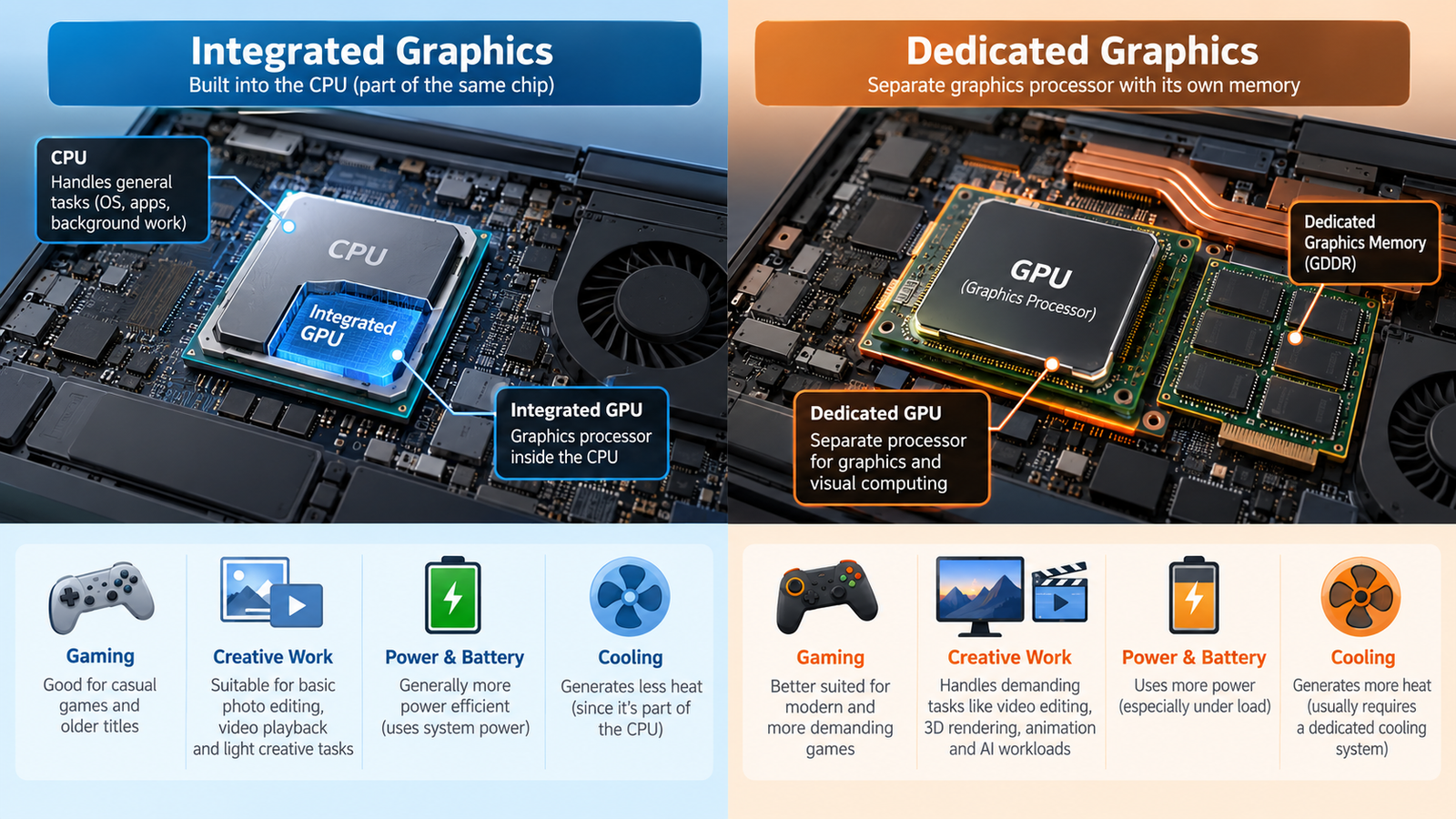
Every laptop needs something to draw what you see on screen, from a spreadsheet to a video game. That job belongs to the graphics processor, or GPU. The main question in the integrated vs dedicated graphics debate is where that GPU lives and how it gets its memory.
Buyers often ask whether they need a dedicated graphics card or whether integrated graphics is enough. The honest answer is that it depends on what you do, which software you use and which exact laptop you’re looking at. This guide explains both approaches from scratch so you can decide for yourself.
Quick Answer: Integrated vs Dedicated Graphics
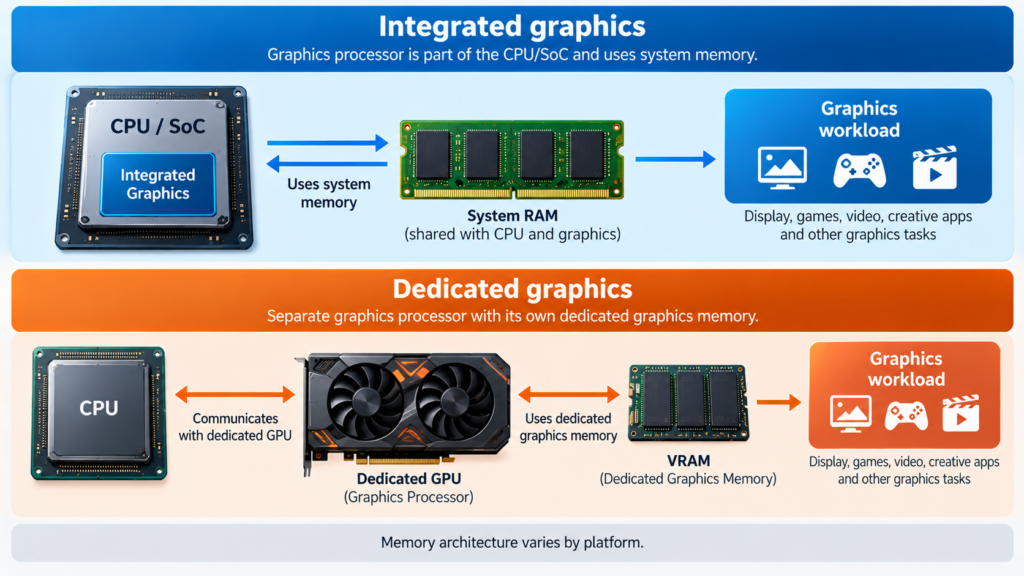
Integrated graphics is a GPU built into the processor or the main system chip, rather than a separate graphics chip with its own dedicated memory. Its memory setup depends on the platform, and in many systems it shares the computer’s main memory (RAM).
Dedicated graphics is a separate graphics processor built as a discrete graphics solution. In many systems it comes with its own graphics memory, known as VRAM.
Integrated graphics can be enough for everyday computing and many lighter workloads. Dedicated graphics are designed for workloads that need much more graphics processing capability. Still, suitability depends on the specific GPU, the software and the laptop’s configuration. “Dedicated” doesn’t automatically mean powerful, and “integrated” doesn’t automatically mean weak.
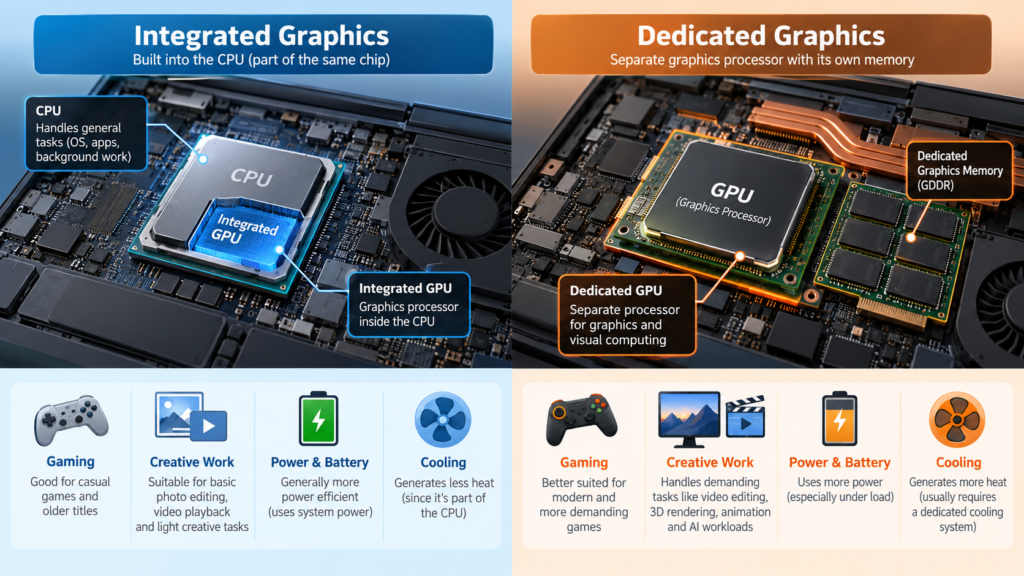
What Is an Integrated GPU?
An integrated GPU (iGPU) is a graphics processor built into the same processor package or system architecture as the CPU. It isn’t a separate card or a separate graphics chip with its own dedicated memory. Many laptop processors from Intel and AMD include integrated graphics, though details differ by processor and platform. Understanding how processor families are named helps here, and our guide to laptop processor names explained covers it.
Memory. Integrated graphics generally uses the system’s main memory rather than a separate pool of graphics memory. An integrated GPU still has memory to work with, since it draws on the same RAM as the rest of the computer. How much it can use, and how it’s managed, depends on the platform.
Power. Because integrated graphics shares the processor’s power and cooling budget, it’s generally designed for lower system power requirements. That’s one reason it’s common in thin, light and battery-focused laptops.
Typical uses. Web browsing, office work, streaming, video calls, schoolwork, light photo editing and some lighter games. Modern integrated graphics can handle a range of workloads, but not every integrated GPU is alike. Capabilities vary by processor family and by the memory the system pairs with it.
What Is a Dedicated GPU?
A dedicated GPU (also called a discrete GPU) is a separate graphics processor designed as its own graphics solution. In many systems it comes with dedicated graphics memory (VRAM) that the GPU uses for its own work. In laptops, this often means a separate graphics chip on the motherboard, sometimes marketed as a “laptop graphics card.” In desktops it’s typically a removable graphics card.
Advantages for graphics workloads. Dedicated GPUs generally target more demanding graphics tasks such as modern games, 3D work, GPU-accelerated creative applications and GPU computing. They typically have more processing resources devoted to graphics than integrated solutions, though this depends on the exact GPU.
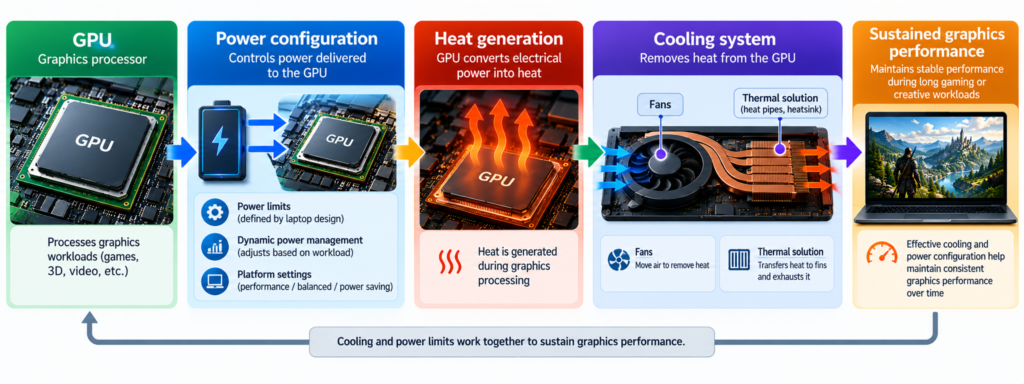
Power and cooling. A separate GPU adds its own power draw and heat, so the laptop needs a cooling system and power design that can handle it.
Not automatically high-end. Dedicated GPUs come in a wide range of performance levels, from entry-level to very powerful. A modest dedicated GPU is not automatically stronger than a capable integrated one, so always compare specific GPU models rather than the label.
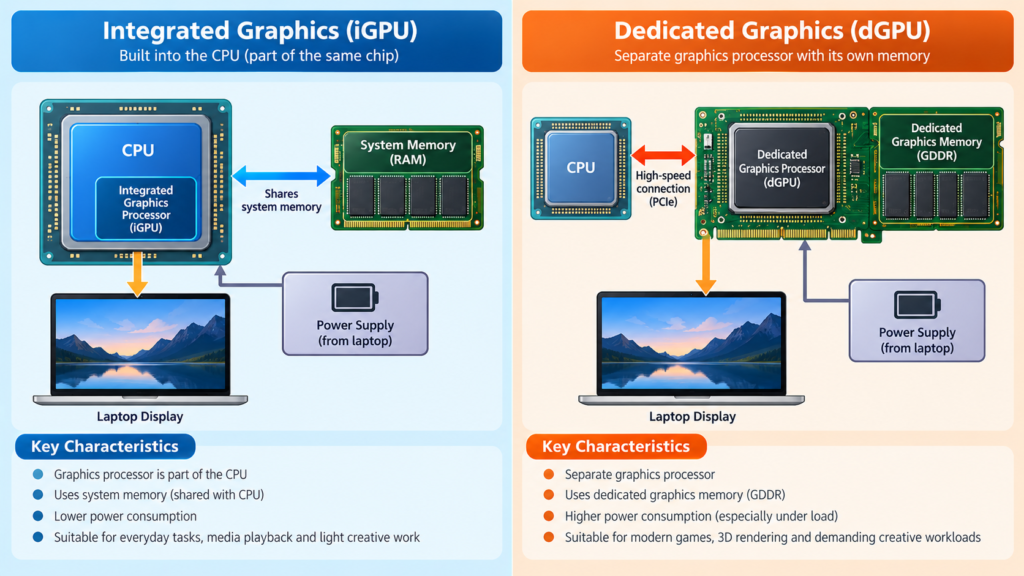
Integrated GPU vs Dedicated GPU: Key Differences
| Factor | Integrated Graphics | Dedicated Graphics |
|---|---|---|
| Physical design | Integrated into processor/system architecture | Separate graphics solution |
| Graphics processing | Depends on the specific integrated GPU and platform | Depends on the specific dedicated GPU; the range is wide |
| Memory | Uses system memory / shared architecture, depending on platform | Commonly has dedicated graphics memory |
| Power | Generally designed for lower system power requirements | Can require more power, depending on the GPU |
| Heat | Typically lower graphics-related thermal demand | Can generate more heat under graphics workloads |
| Gaming | Depends on the specific integrated GPU | Depends on the specific dedicated GPU |
| Content creation | Suitable for some workloads | Can benefit demanding GPU-accelerated workloads |
| Portability | Often suitable for thinner, lighter systems | May require more substantial cooling |
| Battery considerations | Depends on the complete system | Depends on the GPU and laptop design |
| Cost | Often included with the processor/system | Adds to system cost in many laptops |
| Typical workloads | Everyday computing, streaming, lighter creative and gaming tasks | Demanding games, 3D, CAD, GPU-accelerated creative work, GPU computing |
Read the table as a description of design differences, not a ranking. The exact GPU and the exact laptop matter more than the category.
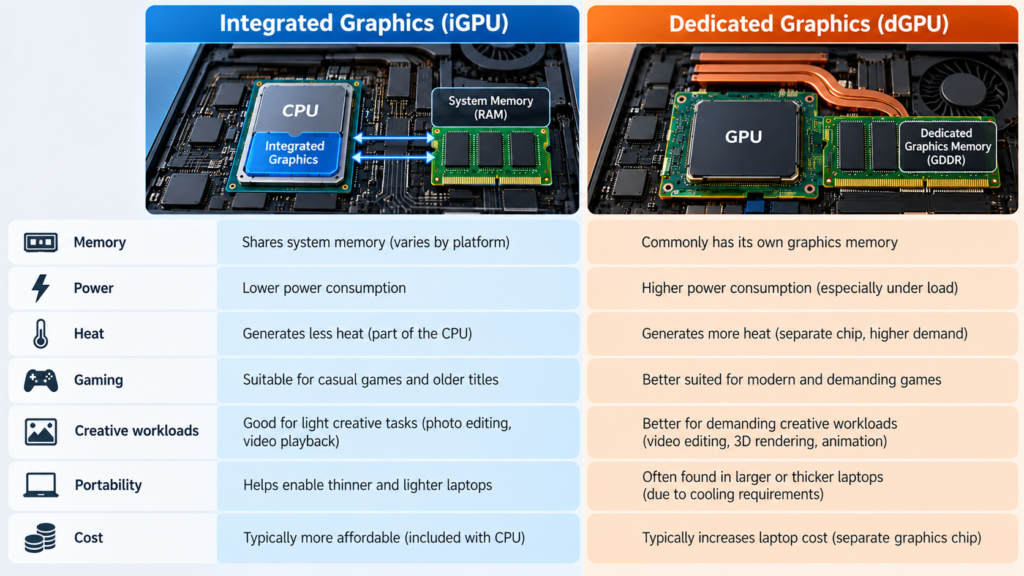
Integrated Graphics and System RAM
System RAM is the computer’s main working memory, shared by the operating system, apps and, on many integrated-graphics systems, the graphics hardware. “Shared memory” means the CPU and integrated GPU draw on the same pool rather than the GPU having a private one.
Three things follow from that:
- RAM capacity matters. If graphics and applications both draw on system memory, the total available affects how comfortably everything runs. How much memory graphics can use varies by system, so there’s no universal figure.
- Memory bandwidth can matter. Bandwidth is how quickly data can move to and from memory. Graphics work moves a lot of data, so the speed and configuration of a laptop’s memory can influence integrated graphics performance.
- The whole system counts. Two laptops with the same processor family can behave differently depending on their memory setup, cooling and power limits.
Not every system handles memory allocation the same way, and this article doesn’t claim a required amount of RAM for integrated graphics.
Dedicated Graphics and VRAM
VRAM (video memory) is memory attached to a dedicated GPU, used for the data the GPU is actively working with:
- Textures, the images wrapped onto 3D objects and surfaces
- Frame buffers, which hold the images being drawn to your screen
- Other graphics data, such as geometry and intermediate results
VRAM capacity can affect whether a workload fits comfortably in the GPU’s memory. Memory type and design vary between GPUs, so two dedicated GPUs may differ in capacity, speed and architecture.
Even so, more VRAM does not automatically make a GPU faster. Graphics performance comes from a combination of GPU architecture, processing capability, memory bandwidth, VRAM, software and the workload. For a deeper look at capacity, see our guide on how much GPU memory you need.
Integrated vs Dedicated Graphics for Gaming
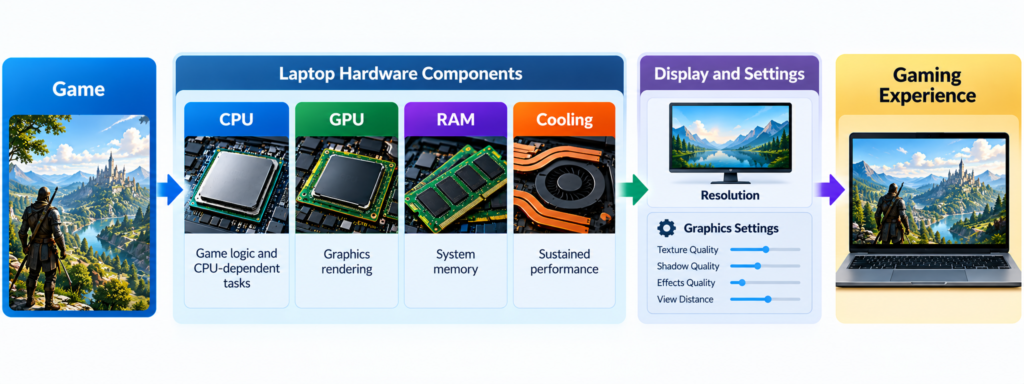
Games ask the GPU to draw complex scenes many times per second, so stronger graphics hardware can help. But “integrated or dedicated?” is only part of the story:
- Integrated graphics capabilities vary by processor and platform.
- Dedicated GPUs generally target more demanding graphics workloads, but they range widely in capability.
- Performance depends on the GPU, CPU, RAM, cooling, resolution and game settings together.
A dedicated GPU doesn’t guarantee that every game will run well. A demanding game at high resolution and settings can strain any hardware, while a lighter game at modest settings may run fine on capable integrated graphics. For a specific game and laptop, check published benchmark results for that exact GPU, laptop, game, resolution and settings. Results vary from system to system and shouldn’t be generalized.
Game
  ↓
GPU
  ↓
CPU
  ↓
RAM
  ↓
Cooling
  ↓
Resolution / Settings
  ↓
Actual gaming performance
The CPU handles game logic and other CPU-dependent tasks, and the GPU renders the graphics. This is also why the processor’s brand doesn’t decide gaming performance on its own. RAM matters because the system needs enough memory for the game and everything else. Cooling matters because performance often depends on how well the laptop can sustain its speed over time.
Integrated vs Dedicated Graphics for Everyday Use
For web browsing, office work, email, documents, video streaming, video calls and basic multitasking, integrated graphics may be sufficient for many people. A dedicated GPU is not required for ordinary laptop use.
Other parts of the laptop often matter more for day-to-day comfort: RAM, storage, the CPU, the display and battery life. If your workload is mostly the above, a dedicated GPU may add cost, weight and power draw without a benefit you’d notice.
Integrated vs Dedicated Graphics for Video Editing
Video editing touches the GPU in several places: smooth playback, timeline scrubbing, effects, rendering and encoding. Some editing software can use the GPU to accelerate some of these tasks, and how much varies by application, version and the effects you use.
Not all video editing requires a dedicated GPU. Simple cuts at modest resolutions may run acceptably on capable integrated graphics, while heavy effects, high-resolution footage or GPU-accelerated features may benefit from a stronger GPU. The CPU, RAM and storage also matter. Check your editing software’s published system requirements and supported hardware. (Needs Editorial Verification for any specific software claims.)
Integrated vs Dedicated Graphics for Photo Editing
Photo editors can use the GPU for some filters, effects and display acceleration, especially with high-resolution images or complex edits. The exact application and workload matter, since some features are GPU-accelerated and others rely mostly on the CPU and RAM. For basic edits, integrated graphics may be adequate. For heavy filters or large files, check the software’s documentation.
Integrated vs Dedicated Graphics for 3D and Creative Work
3D modeling, rendering, CAD, animation and GPU-accelerated effects can put heavy demands on graphics hardware. These more demanding workloads may benefit from dedicated GPU hardware, which generally provides more graphics processing resources and often dedicated memory.
Not every creative application requires a dedicated GPU. Requirements vary widely between tools and project sizes, and some professional applications publish certified or recommended hardware lists worth checking. (Needs Editorial Verification for specific application claims.)
Integrated vs Dedicated Graphics for Programming and General Productivity
Most programming, writing and office work doesn’t automatically require a dedicated GPU. Exceptions include:
- GPU computing and AI/ML workloads, where GPU capabilities and software support (such as CUDA, OpenCL or other frameworks) affect what you can run
- 3D development and game development
- Other GPU-accelerated workflows
If you’re in one of those areas, check your tools’ documentation for which GPUs they support rather than assuming.
Power, Heat and Cooling
Compared with running integrated graphics alone, a dedicated GPU can affect:
- Power consumption: extra graphics hardware may draw more power under load
- Heat: more power generally means more heat
- Cooling requirements: the laptop needs to move that heat away
- Fan behavior: fans may run harder or louder under heavy graphics loads
- Laptop size and weight: cooling systems and batteries take space
- Battery usage: heavy graphics work can drain a battery faster
None of this is universal. Power draw depends on the workload, and modern laptops may dynamically switch between graphics solutions based on the task and system design, so a dedicated GPU doesn’t consume more power in every situation.
Integrated vs Dedicated Graphics in Laptops
Laptops add constraints that desktops mostly avoid:
- Chassis size and weight: thinner laptops have less room for cooling and battery
- Cooling system: fans, heat pipes and vents determine how much heat can be removed
- Power limits: manufacturers set how much power the GPU may use
- Battery: capacity and power management affect runtime
- Portability: the more hardware inside, the more it usually affects size and weight
- Manufacturer configuration: firmware and settings shape behavior
Because of this, two laptops with similar or even identical GPU models can perform differently in real use. A GPU in a thin laptop with tighter power and cooling limits may not match the same GPU model in a thicker chassis. Also, laptop GPUs are not the same as desktop GPUs of similar names, so don’t mix specifications between them.
When comparing models, look at reviews of the exact laptop, not just the GPU name. For the broader buying process, see our guide on how to choose a laptop.
How Laptop Graphics Switching Works
Many laptops contain both an integrated GPU and a dedicated GPU. At a high level, such a laptop can use integrated graphics for lighter tasks and dedicated graphics for heavier ones, which can help balance battery life and performance.
Implementation varies by laptop. Not every model supports the same switching approach, and some let you choose a preferred GPU per app in system settings or manufacturer software. Some laptops offer different graphics modes, but availability depends on the model.
How to Tell Whether a Laptop Has Integrated or Dedicated Graphics
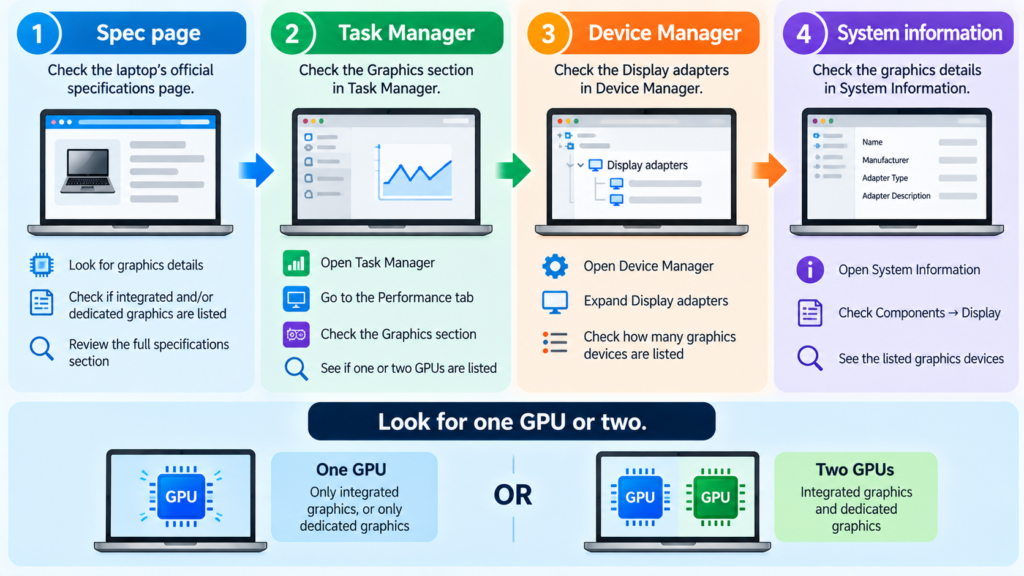
A laptop can contain both an integrated GPU and a dedicated GPU, so check for both. Ways to check:
- Product specification page. Look at the “Graphics” line on the manufacturer’s or retailer’s page. Note whether it lists one GPU or two.
- Manufacturer’s full specification sheet. Retail listings can be vague, so confirm the exact GPU model here.
- Windows Task Manager. On the Performance tab, look for one or more GPU entries. Laptops with two GPUs may show two.
- Device Manager. Expand “Display adapters” to see the graphics devices Windows detects.
- System information tools. Windows System Information and GPU information utilities list graphics hardware.
- Model number lookup. If you’re unsure, search the exact laptop model on the manufacturer’s site.
Menu names and layouts change between Windows versions.
Which One Do You Need?
There’s no ranking here, only questions to ask about your own use.
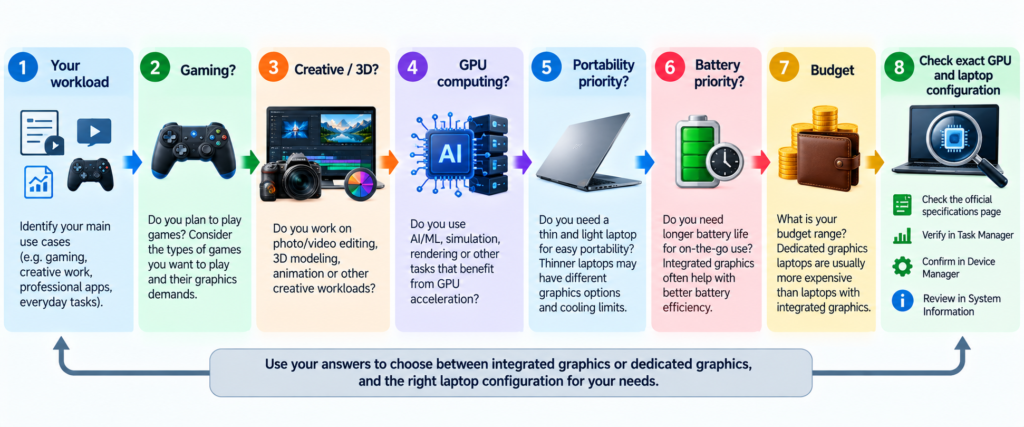
For Web Browsing and Office Work
Look at the CPU, RAM, storage, display and battery life first. Integrated graphics may be enough, and a dedicated GPU may add cost and weight you don’t need.
For Students
Most coursework (documents, research, video calls, streaming) is well within what integrated graphics is designed for. Check your course’s software requirements first, especially in design, engineering, film or computer science programs, where specific graphics needs can apply.
For Casual Gaming
Check the specific games you want to play, their published system requirements and the resolution and settings you’re comfortable with. Lighter games may run on capable integrated graphics, while more demanding titles may call for a dedicated GPU. Look up benchmarks for the exact GPU and laptop, and remember that CPU, RAM and cooling all count.
For Competitive or Demanding Gaming
Look at the exact GPU model, the laptop’s cooling and power limits, the display’s resolution and refresh rate, and reviews that test sustained performance. A GPU’s name alone won’t tell you how it behaves in a particular chassis.
For Video Editing
Check your editing software’s requirements and which of its features use the GPU. Consider the CPU, RAM and storage alongside graphics. A dedicated GPU can help with GPU-accelerated features, but the benefit depends on the software and your projects.
For 3D/CAD
Check the application’s recommended or certified hardware. Demanding models and rendering often benefit from stronger dedicated graphics and adequate graphics memory, but requirements vary by application and project size.
For AI and GPU Computing
Software compatibility and GPU capabilities matter in addition to raw performance. Check which GPUs your frameworks support and how much graphics memory your workloads need. See how much GPU memory you need
For Portable/Battery-Focused Laptops
Integrated graphics is common in thin, light designs, and a laptop with switching graphics may combine longer battery life on light tasks with more capability when needed. The trade-offs are size, weight, cost and, under heavy loads, battery life. Battery life depends on the whole system, so look for reviews of the specific model.
For Long-Term Laptop Use
Think about the software you expect to use over the laptop’s useful life. Software requirements tend to grow, and most laptop GPUs can’t be upgraded later. If you expect your needs to grow toward gaming, creative or GPU-compute work, that may influence the choice now, weighed against budget and portability.
Common Integrated vs Dedicated GPU Misconceptions
- “Integrated graphics are always weak.” Integrated GPUs vary widely, and capable ones can handle a range of everyday and lighter workloads. Weak or strong depends on the specific hardware.
- “Dedicated graphics are always better.” Dedicated GPUs range from entry-level to very powerful, and they add cost, power draw and heat. Whether they’re the right fit depends on your workload.
- “Integrated GPUs have no memory.” They do use memory, typically shared system memory rather than a separate dedicated pool. Details vary by platform.
- “More VRAM automatically means a faster GPU.” VRAM capacity affects whether a workload fits, but speed depends on GPU architecture, processing resources, memory bandwidth and more.
- “A dedicated GPU is required for all gaming.” Some games run on capable integrated graphics. Requirements depend on the game, resolution and settings.
- “A dedicated GPU is required for video editing.” Not always. Software, footage and effects matter, and many tasks lean heavily on the CPU and RAM.
- “CPU brand determines GPU performance.” The CPU brand and the GPU are separate questions. Integrated graphics differs by processor family, and dedicated GPUs come from separate designs. Look at the specific GPU.
- “Two laptops with the same GPU always perform identically.” Cooling, power limits, firmware and chassis design can all change real-world results.
- “More GPU memory automatically means better gaming.” Games depend on the whole system, and a GPU with more memory isn’t guaranteed to deliver a better experience.
- “The GPU model number alone determines performance.” Model names don’t capture power limits, cooling or configuration. Look for reviews of the exact laptop.
Final Takeaway
There’s no universal winner between integrated and dedicated graphics, only a better or worse fit for your needs.
- Integrated graphics is part of the processor or system architecture on many platforms.
- Dedicated graphics is a separate graphics solution, commonly with its own memory.
- Integrated graphics may be sufficient for everyday workloads.
- Dedicated graphics can be useful for more demanding graphics workloads.
- The exact GPU’s capabilities matter more than the integrated/dedicated label.
- VRAM matters, but it isn’t the only performance factor.
- Laptop cooling and power configuration matter.
- The right choice depends on your workload, priorities and budget.
Before you buy, identify the exact GPU, read reviews of the exact laptop and check the requirements of the software you use.
Frequently Asked Questions
What is the difference between integrated and dedicated graphics?
Integrated graphics is built into the processor or system architecture and, in many systems, uses shared system memory. Dedicated graphics is a separate graphics processor, commonly with its own graphics memory (VRAM).
Is integrated graphics enough for everyday laptop use?
For web browsing, office work, streaming, email and video calls, integrated graphics may be sufficient for many people. It depends on your specific software and displays.
Do I need a dedicated GPU for gaming?
Not necessarily. Some games run on capable integrated graphics, especially lighter titles or lower settings. More demanding games generally benefit from stronger GPUs, but results depend on the exact GPU, CPU, RAM, cooling, resolution and settings.
Is a dedicated GPU better for video editing?
It can help with GPU-accelerated features in some software, but it isn’t always required. Software support, footage type and effects all matter, and the CPU, RAM and storage matter too.
Does integrated graphics use RAM?
On many platforms, yes. It typically uses shared system memory, though how memory is allocated varies by system.
What is VRAM?
VRAM is memory attached to a dedicated GPU, used for textures, frame buffers and other graphics data. See how much GPU memory you need for more.
Does more VRAM mean a faster GPU?
No. VRAM capacity affects whether certain workloads fit comfortably in graphics memory, but speed also depends on GPU architecture, processing resources, memory bandwidth and software.
Can a laptop have both integrated and dedicated graphics?
Yes. Many laptops include both and may switch between them depending on the workload and system design.
Does a dedicated GPU reduce battery life?
It can, particularly under heavy graphics loads, but it isn’t universal. Battery life depends on the workload, the whole laptop design and how the system switches between graphics.

Related Articles
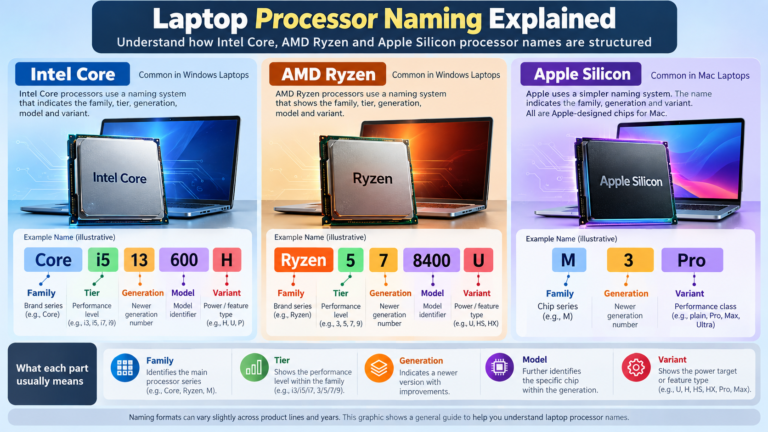
Laptop Processor Names Explained: Intel Core, Ryzen and Apple Silicon
You’re looking at a laptop listing that says “Intel Core Ultra 5 228V” or “AMD Ryzen AI 7 350” or “Apple M5 Pro”. What […]
Intel Core vs AMD Ryzen: Which Processor Is Right for You?
Shopping for a new laptop almost always comes down to one early decision: Intel or AMD? The processor badge on the lid feels like […]
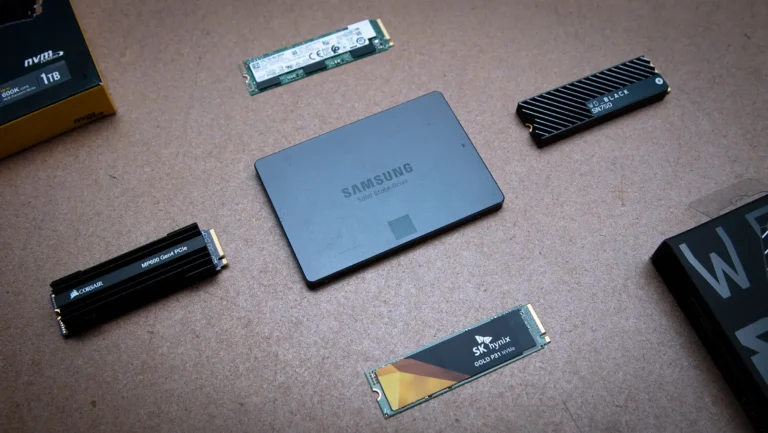
NVMe SSD vs SATA SSD: Speed, Performance and Real-World Differences
If you’ve shopped for a laptop or PC upgrade recently, you’ve probably seen “NVMe SSD” and “SATA SSD” listed as if they’re two flavors […]
Comments (0)