Google Gemini Proactive Assistance: The Future of AI Anticipation
Imagine your phone nudging you to review a presentation before your boss even sends the calendar invite. That’s not science fiction anymore. Google Gemini […]
Contributor
Imagine your phone nudging you to review a presentation before your boss even sends the calendar invite. That’s not science fiction anymore. Google Gemini Proactive Assistance is here, and it’s quietly rewriting the rules of how AI fits into your daily workflow. Rather than waiting for you to ask a question, Gemini watches the patterns in your digital life and steps in intelligently, contextually, and (mostly) at exactly the right moment. This isn’t just another notification system dressed up in AI clothing. Proactive Assistance represents a fundamental shift in Google’s AI strategy moving from reactive chatbot to anticipatory digital partner. For power users, productivity nerds, and everyday Android owners alike, this is one of the most consequential AI features Google has shipped in years. In this deep-dive, we break down exactly how it works, which apps support it, what it means for your privacy, and how to take control of it all with the depth.
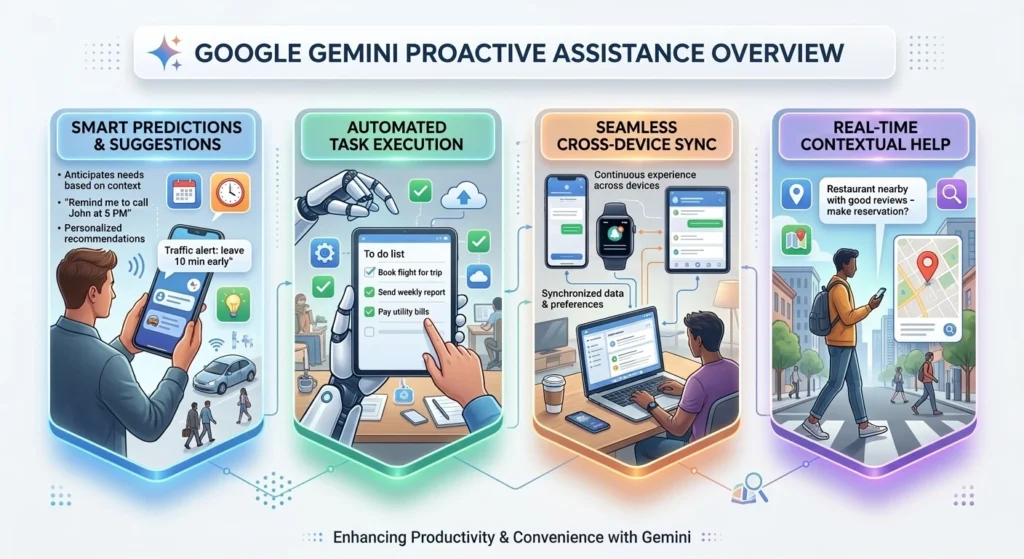
How Does Google Gemini Predict User Tasks?
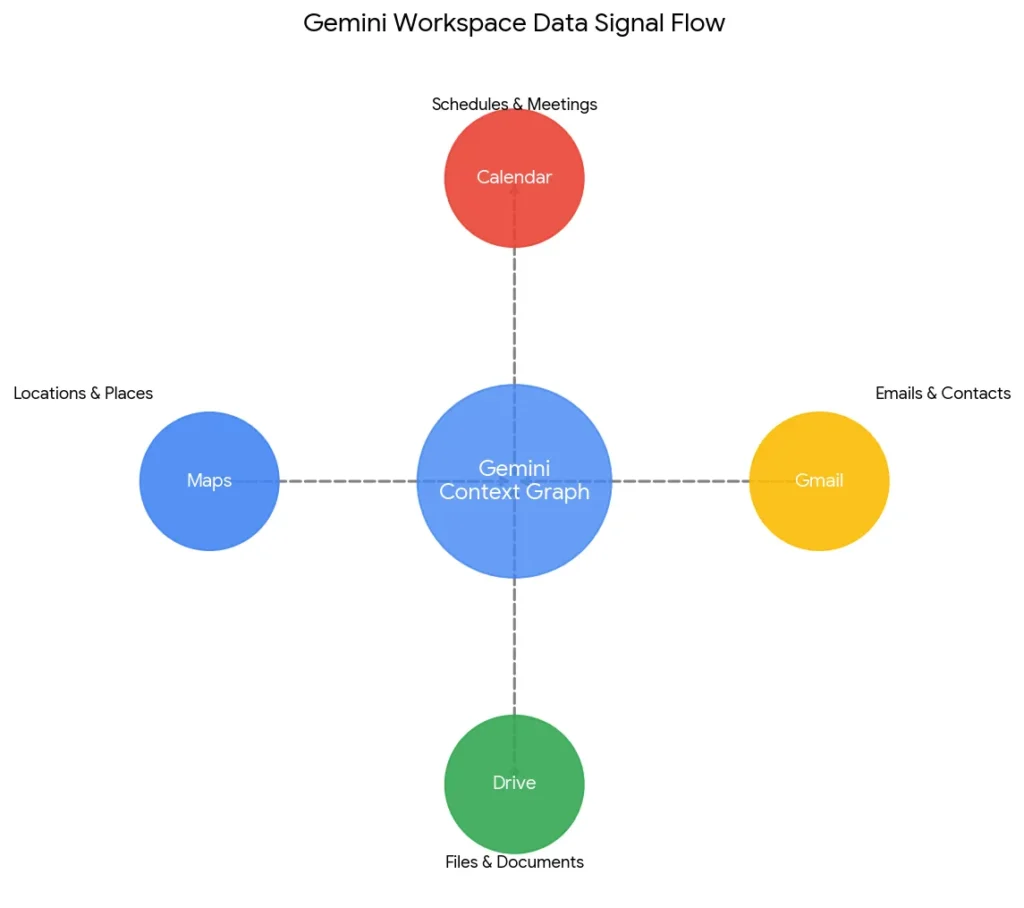
Gemini predicts user tasks by continuously analyzing signals across your connected Google apps including Calendar, Gmail, Drive, Maps, and Chrome using a combination of on-device machine learning models and cloud-based contextual reasoning. Think of it like a very attentive assistant who has quietly read every email you’ve sent and every meeting you’ve attended. Gemini builds what Google internally calls a ‘personal context graph’, a dynamic map of your habits, schedules, relationships, and frequently completed actions. When a familiar pattern emerges, Gemini surfaces a suggestion before you even open the relevant app.
For example: if you have a recurring Monday 9 AM standup in Google Calendar and you typically draft meeting notes in Google Docs afterward, Gemini may proactively create a linked Doc template on Sunday evening, ready and waiting by the time you sit down.
Key prediction signals Gemini monitors:
- Calendar events — titles, attendees, recurrence patterns
- Email threads — deadlines, action items, follow-up cues
- Location and commute data from Google Maps
- App usage patterns and time-of-day behavior
- File activity in Google Drive and Docs
According to Google’s I/O 2024 presentations, the Gemini 1.5 Pro model underpinning this feature handles context windows of up to one million tokens enabling it to hold the equivalent of roughly 700,000 words of personal context in a single reasoning pass. That’s what makes the predictions feel genuinely personal rather than generic.
What Is the Difference Between Gemini Proactive Assistance and Standard Notifications?
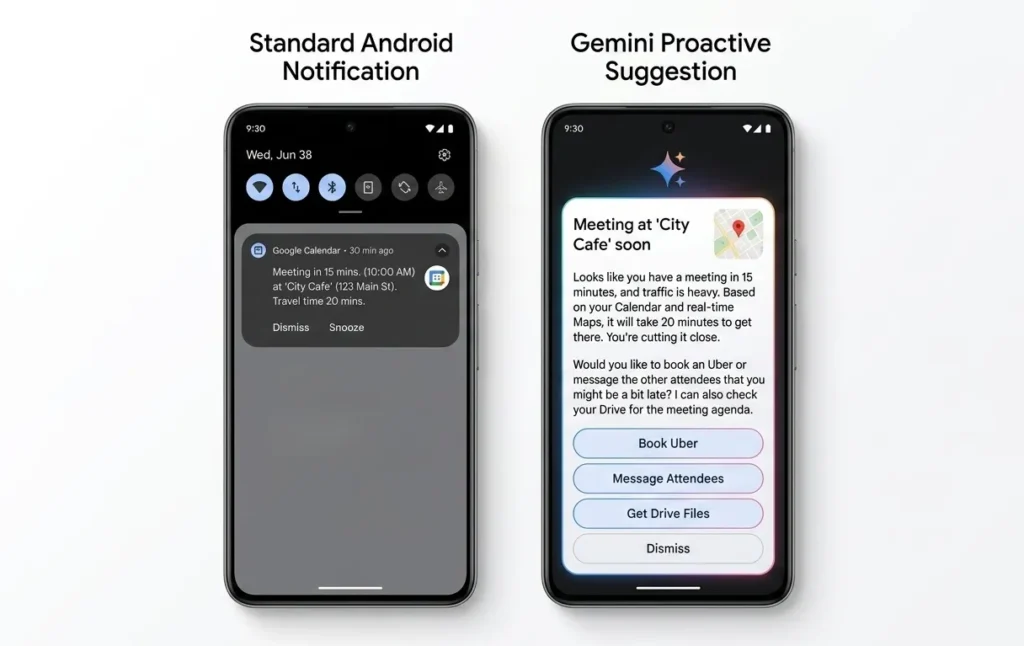
Gemini Proactive Assistance is fundamentally different from standard notifications: traditional notifications are triggered by explicit app events, while Gemini’s proactive suggestions are generated by AI inference, meaning they appear before any direct trigger occurs, based on predicted need.
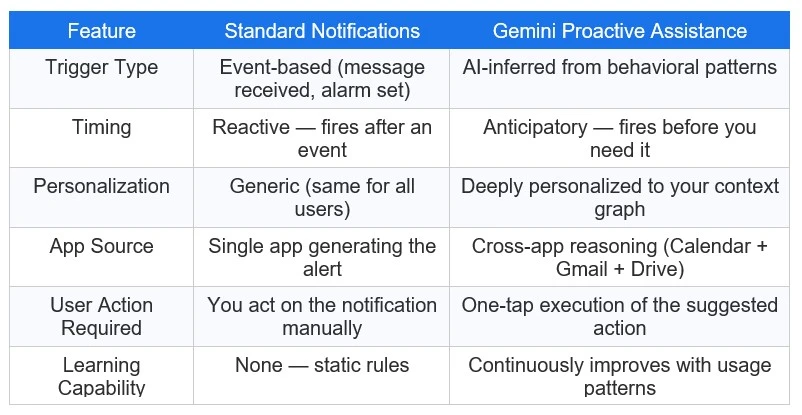
Standard app notifications are, in essence, dumb pipes, they relay information but don’t interpret it. Gemini’s system, by contrast, is doing real cognitive work: weighing context, timing, relevance, and urgency before deciding whether to surface a suggestion at all.
Google has also built a relevance threshold into the system. If Gemini’s confidence that you need a suggestion doesn’t clear a certain internal score, it won’t bother you. The goal is to be helpful without becoming the AI equivalent of a needy coworker who pings you every five minutes.
Which Google Workspace Apps Support Proactive Suggestions?
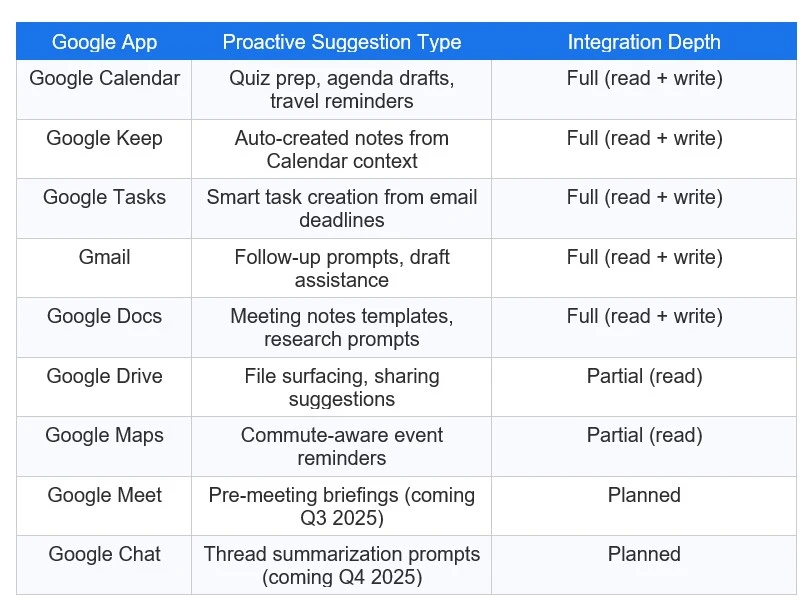
Google Gemini Proactive Assistance is natively integrated with Google Calendar, Google Keep, Google Tasks, Gmail, Google Docs, Google Drive, and Google Maps with further integration into Google Meet and Google Chat. The depth of integration varies by app. Some apps receive full two-way proactive assistance (both suggestions and automated action execution), while others are currently limited to read-only context contribution meaning Gemini pulls signals from them but doesn’t yet push suggestions back into them.
Automated Practice Quizzes from Google Calendar Events
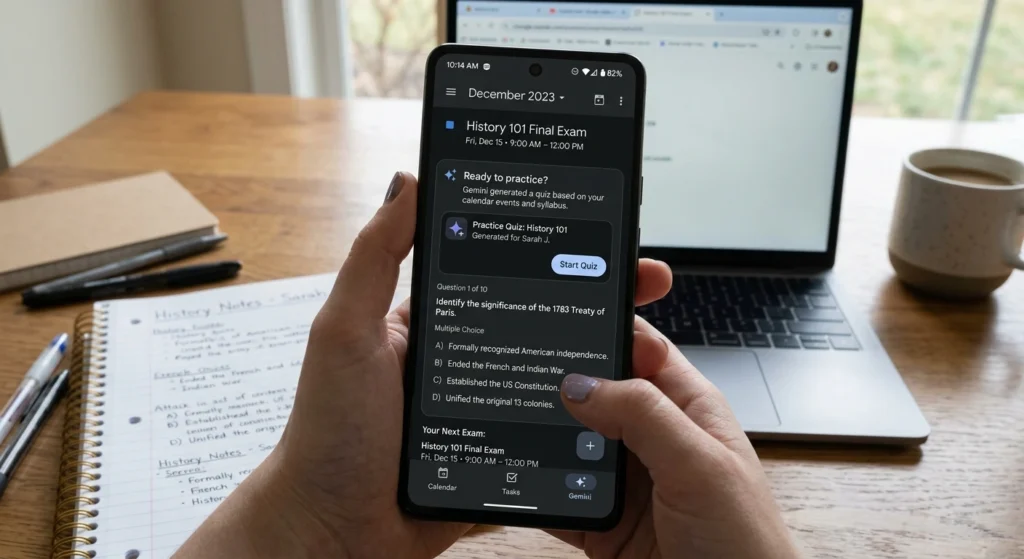
One of the most compelling features in the Gemini Proactive Assistance rollout is its ability to generate automated practice quizzes directly from your Google Calendar events specifically when it detects exam, certification, or study-related entries.
Here’s how it works in practice: You add ‘AWS Solutions Architect Exam’ to your calendar for three weeks from today. Gemini recognizes the event type, cross-references any related study materials it finds in your Drive or linked Google Classroom, and proactively generates a set of practice questions surfaced through the Gemini app or a connected Google Docs file.
What the quiz generation considers:
- Event title keywords (exam, test, certification, interview)
- Duration and proximity to the event date
- Related documents in your Google Drive or Classroom
- Your historical interaction patterns with similar events
The quizzes are not rigid multiple-choice sets. Gemini crafts open-ended prompts, scenario-based questions, and summary exercises calibrated to the subject matter. It’s closer to having a tutor pre-load your study session than simply flipping through flashcards.
Smart Task Creation in Google Keep and Tasks
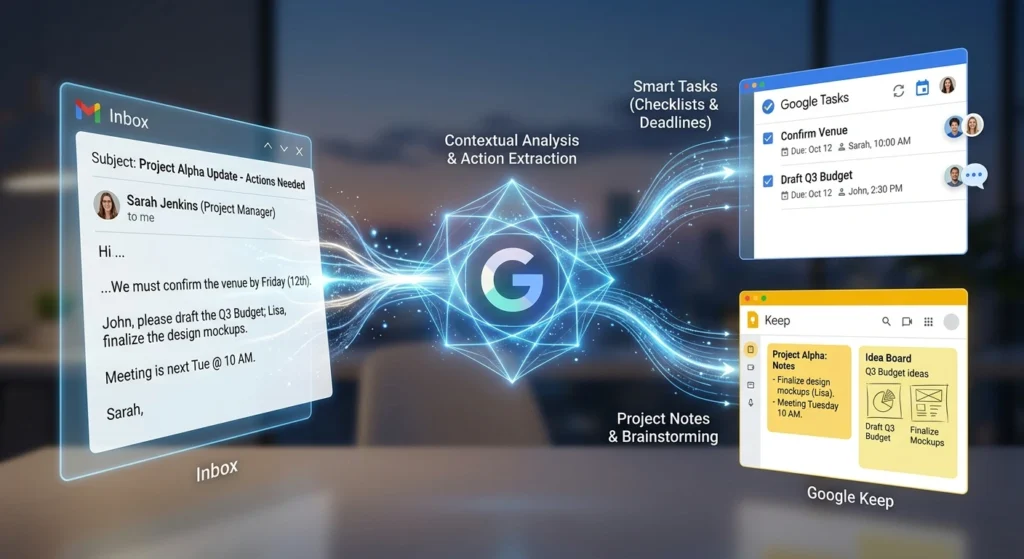
Gemini Proactive Assistance integrates deeply with Google Keep and Google Tasks to intelligently convert unstructured information, a forwarded email, a calendar description, a shared document into actionable, structured tasks, without you lifting a finger.
Say you receive an email from a client that includes phrases like ‘please finalize the proposal by Friday’ and ‘don’t forget to add the budget breakdown.’ Gemini parses the language, identifies the implicit deadlines and action items, and proactively surfaces a card in Google Tasks: ‘Finalize proposal (Due: Friday)’ with a sub-task: ‘Add budget breakdown.’
Google Keep benefits from a parallel feature. When Gemini detects you’re building toward a project multiple related searches, a few saved links, some notes it may proactively suggest a Keep collection that aggregates all of it, saving you the organizational overhead.
Smart task creation triggers include:
- Emails containing deadline language (‘by EOD,’ ‘before Friday,’ ‘ASAP’)
- Calendar event descriptions with preparatory action items
- Google Docs comments assigned to you
- Repeated search queries suggesting ongoing research needs
This is the productivity equivalent of having a Chief of Staff who does your task triage. A 2023 McKinsey Global Institute report estimated that knowledge workers spend nearly 28% of their workweek on email management and administrative coordination. Gemini’s smart task creation is explicitly designed to eat into that wasted time.
Does Proactive Assistance Use On-Device Processing for Privacy?
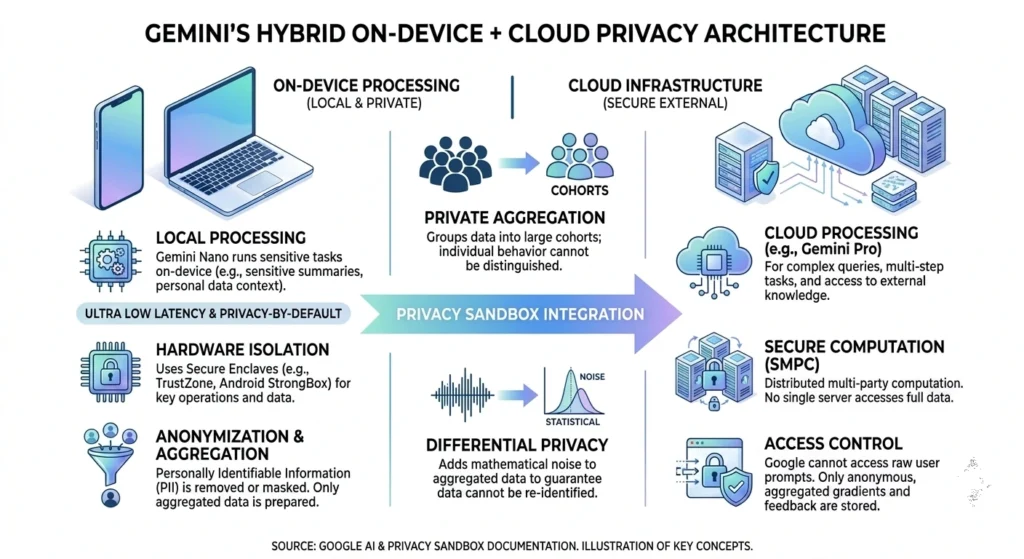
Yes, partially. Google Gemini Proactive Assistance uses a hybrid processing model: lighter, real-time contextual inference happens on-device via Google’s on-device AI stack (built on the Gemini Nano model), while more complex, cross-app reasoning is processed in Google’s secure cloud infrastructure.
This architecture is a deliberate privacy-performance trade off. Running everything, on-device would be slower and drain battery life significantly, while full cloud processing would expose more personal data to remote servers. The hybrid model tries to thread the needle.
Google has been explicit that proactive suggestions are processed under the same data policies as Google Workspace, meaning the content of your emails and documents is not used to train Gemini’s public models without explicit user consent. Under Google’s AI Principles, first published in 2018 and updated in 2024, personalized AI features must offer clear opt-out mechanisms and transparent data handling.
Processing Type | What It Handles | Privacy Consideration |
|---|---|---|
On-Device (Gemini Nano) |
Real-time pattern matching, quick suggestions |
Data never leaves device |
Cloud (Gemini 1.5 Pro) |
Complex cross-app reasoning, quiz generation |
Encrypted, not used for model training |
Hybrid |
Contextual reminders, task extraction from email |
Split processing with anonymization layer |
Privacy researchers at EFF and Mozilla Foundation have noted that the on-device component is a genuine privacy win, your routine behavioral signals (which apps you open, when you check your calendar) never touch a remote server. The cloud component, however, requires trusting Google’s data governance, which remains a sticking point for enterprise users with strict compliance requirements.
How to Turn Off Gemini Proactive Assistance in Android Settings
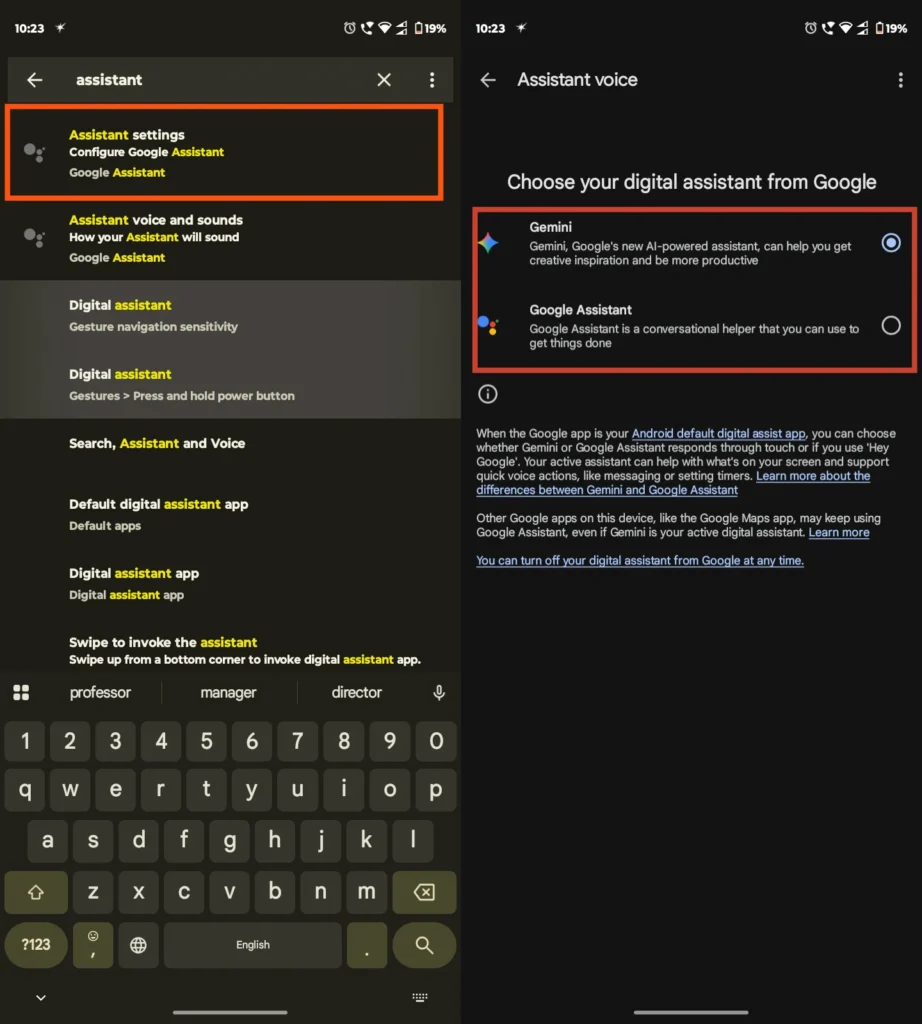
To turn off Gemini Proactive Assistance on Android, navigate to Settings > Google > Gemini > Proactive Suggestions and toggle the feature off. On Pixel devices running Android 14 or later, you can also access this directly through the Gemini app’s own settings menu under ‘Personalization & Suggestions.’
While Google has designed Proactive Assistance to be genuinely useful, not every user wants an AI pre-emptively reshaping their workflow. Whether it’s a privacy preference, a desire for fewer interruptions, or simply not wanting an AI to ‘know’ your schedule, disabling the feature is straightforward and fully reversible.
Step-by-step: Disabling Gemini Proactive Assistance on Android
- Open the Settings app on your Android device.
- Scroll to Google and tap it.
- Select Gemini from the Google services menu.
- Tap Proactive Suggestions.
- Toggle Proactive Assistance off.
- Optional: Individually toggle which apps Gemini pulls context from (Calendar, Gmail, Drive, etc.).
For granular control, say you’re fine with Calendar-based suggestions but not with Gemini reading your Gmail, the per-app permission toggles let you customize exactly which data sources Gemini can access. This granularity is a welcome addition and reflects Google’s post-2023 commitment to giving users more control over AI-powered features.
Future Outlook: Where Is Gemini Proactive Assistance Headed?
Google’s roadmap for Proactive Assistance suggests the feature is only going to deepen its integration across the Google ecosystem and potentially beyond it.
Confirmed features:
- Google Meet pre-meeting briefings — Gemini surfaces relevant emails, docs, and participant context 5 minutes before a call
- Proactive travel packing suggestions — triggered by flight bookings in Gmail
- Health and wellness nudges — integrating with Fitbit and Google Fit data (opt-in only)
- Third-party app integration — developers will be able to build Gemini Extensions that contribute to and receive proactive suggestions
- Gemini for ChromeOS — bringing Proactive Assistance to Chromebook users in educational and enterprise settings
The third-party extension ecosystem is arguably the biggest long-term play. Once Gemini can pull context from Slack, Notion, Spotify, or your bank app (with permission), its ability to predict and pre-empt your needs becomes dramatically more powerful and the gap between Gemini and narrower, single-purpose AI assistants grows wider.
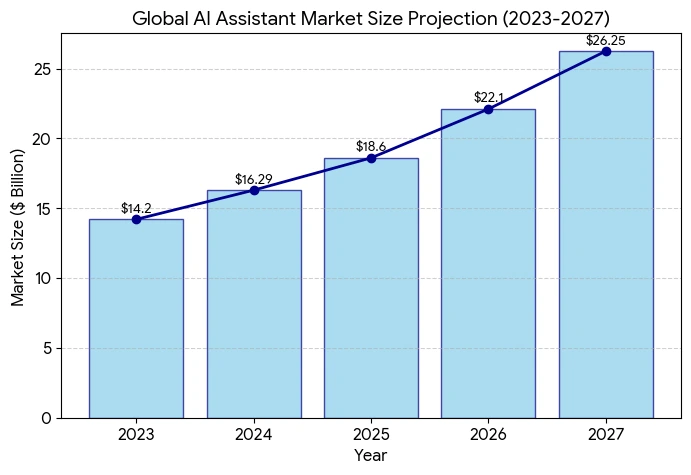
Statista projects that the global proactive AI assistant market will reach $14.6 billion by 2027, growing at a CAGR of 31.4% from its 2023 baseline. Google, with its unmatched first-party data depth and on-device AI infrastructure, sits in an extremely strong position to capture a leading share of that market.
Conclusion: Proactive AI Is No Longer a Concept — It's Here
Google Gemini Proactive Assistance isn’t a feature tweak. It’s a signal that the AI assistant paradigm is completing its evolution from search-and-respond to anticipate-and-act. For anyone invested in productivity, professionally or personally, this is the most important development in Google’s AI roadmap since the original Bard launch.
The privacy architecture is thoughtfully designed, the Workspace integrations are genuinely useful, and the granular controls give users real agency. That said, the feature’s true potential will only emerge as the third-party extension ecosystem matures and the model continues learning from user behavior.
Frequently Asked Questions
1. What is Google Gemini Proactive Assistance?
It is an AI feature that anticipates user needs by suggesting tasks, like creating study guides or meeting summaries, based on your calendar and notifications.
2. How do I turn on Proactive Assistance in Gemini?
Go to the Google app settings on Android, select Gemini, and toggle on the “Proactive Assistance” experimental feature.
3. Which apps work with Gemini Proactive Assistance?
Currently, it supports Google Calendar, Keep, Gmail, Docs, Drive, and Messages.
4. Is my data safe with Gemini Proactive Assistance?
Yes, Google states that Proactive Assistance uses on-device processing to ensure your personal notifications and screen content remain private.
5. Can Gemini create quizzes automatically?
Yes, it can detect upcoming tests in your Calendar and proactively offer to build a practice quiz.
6. Does Gemini Proactive Assistance work on iPhone?
This feature is currently in beta for Android and has not yet been confirmed for the iOS Gemini app.

Swathi is a contributor at GizStreet with a master’s degree in science and a strong background in technical writing and product review. She covers gadgets, software, and consumer tech, with a focus on breaking down complex products into clear, practical takeaways for readers.
Share this story
Related Articles

Haier HQLED P7 Pro Series Arrives in India With Built-In 50W Audio, Google TV and Gemini Integration
Haier's HQLED P7 Pro Series arrives in India with Google TV, Gemini integration, Dolby Atmos, gaming features and prices starting at ₹35,990.
AMD’s Next-Generation EPYC “Venice” Explained: How Zen 6 and 256 Cores Push the Data Center Forward
AMD has unveiled the EPYC 9006 server platform based on Zen 6 with up to 256 cores, PCIe Gen 6 and TSMC's 2nm process. Here's what the official announcements reveal.
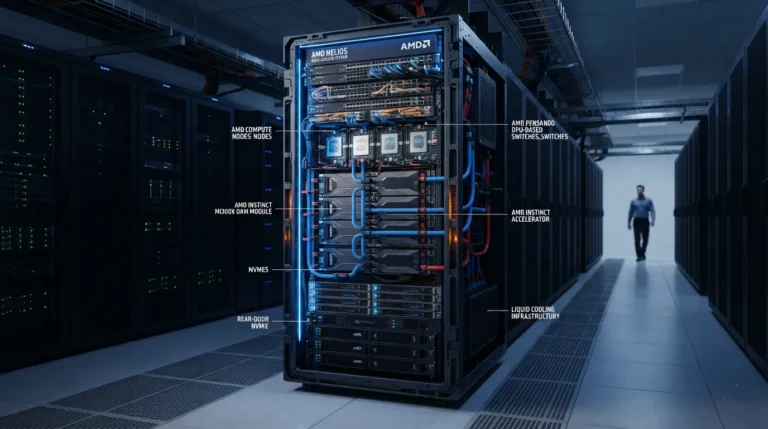
AMD Helios AI Rack: Why AMD Is Moving the AI Race Beyond Individual Chips
AMD Helios is a rack-scale AI infrastructure solution designed for frontier AI workloads, combining AMD GPUs, CPUs, networking, and ROCm software.
Comments (0)