Friday, July 24, 2026
Apps

Windows 11 Search Gets a Major Cleanup: Microsoft Reduces Promotional Results and Puts Local Files First

Microsoft's latest Windows 11 Search update improves local file discovery, reduces promotional web results, and gives users greater control over their Search experience.
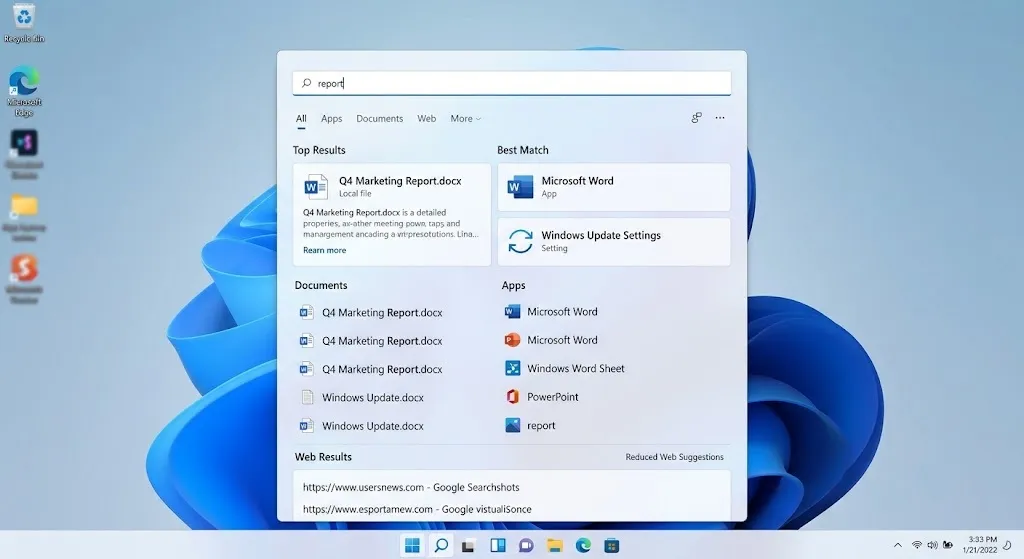
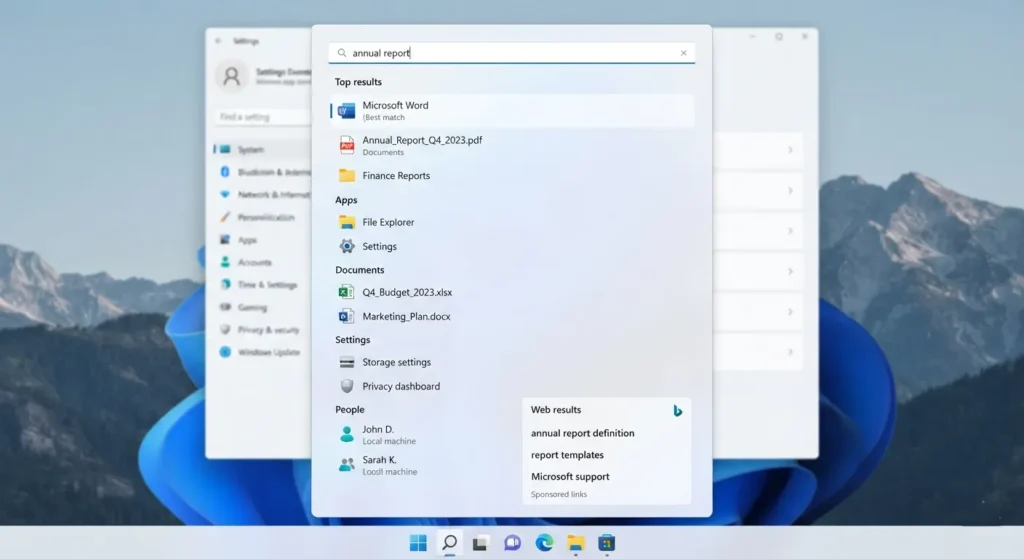
Windows 11 Search interface prioritizing local files and applications.

Executive Summary

Microsoft is rolling out a redesigned Windows Search experience that puts greater emphasis on helping users find local apps, files, and settings while reducing promotional content in web search results. The update is currently available through a gradual Controlled Feature Rollout (CFR) for Windows Insiders in the Experimental channel.

Alongside a cleaner interface, the Windows 11 Search update improves local search ranking, typo recognition, file discovery, and reliability. It also introduces new settings that let users decide whether web and Microsoft Store suggestions should appear in Search.

What Is Changing in Windows Search?

Windows Search has always balanced two roles: acting as a launcher for local content and providing access to web results. Over the years, that balance shifted toward web integration, leaving some users frustrated when online results appeared before files or apps stored on their own PCs.

The latest redesign aims to reverse that trend.

Microsoft says Search will now prioritize local apps, files, and settings whenever they are the most relevant match. At the same time, promotional content that previously appeared within web search results has been removed.

The rollout began on July 13, 2026 for Windows Insiders in the Experimental channel through Microsoft’s Controlled Feature Rollout system.

Updated Windows 11 Search interface.
The redesigned Search experience focuses on local content first.

Key Improvements Included in the Update

The redesigned Search experience focuses on making everyday tasks quicker and less distracting.

FeatureWhat Changed
Cleaner Search Home

Reduced visual clutter with quicker access

to recent searches

Better Local Ranking

Local apps, files, and settings appear ahead of

less relevant web results

Reduced Promotional Content

Promotional items have been removed

from web search results

Better Typo Handling

Improved recognition of misspelled

application names

Improved File Discovery

Easier discovery of local and connected files,

including support for two-character searches

Improved ReliabilityReduced crashes and loading issues
User Controls

Option to enable or disable web

and Microsoft Store suggestions

Users Now Have More Control

The Windows 11 Search update doesn’t simply change what Search displays—it also gives users more control over the experience.

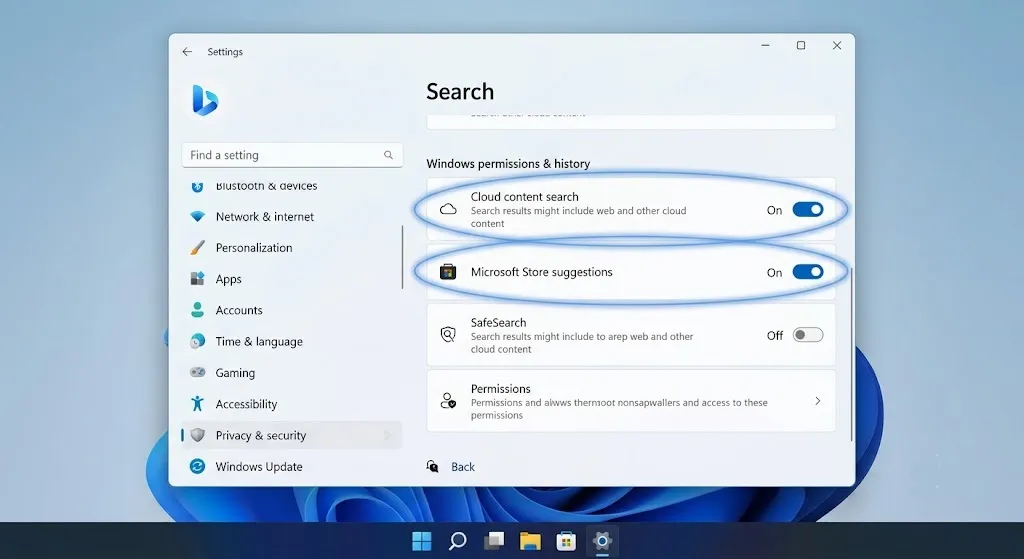
Those who prefer Search as a local launcher can choose whether web results and Microsoft Store suggestions appear alongside local results. The setting is available under:

Settings → Privacy & Security → Search

This flexibility allows users to tailor Search to the way they work instead of relying on a one-size-fits-all experience.

Important: These controls are available only on builds that include the new Search experience.

Windows Search settings page.
Users can customize how Search displays web and Microsoft Store suggestions.

Why Microsoft Is Making This Change

Search is one of the most frequently used features in Windows, and even small improvements can have a noticeable impact on daily productivity.

Microsoft says the redesign was driven by feedback from users who wanted Search to be faster, more accurate, and easier to use. Rather than leading with web content, the updated experience focuses on delivering the most relevant local result first.

That approach better reflects how many people use the taskbar search box—as a quick way to open apps, locate files, or change system settings.

Official Statement

Jeff Petty and Anderson Aiziro from Microsoft’s Windows and Bing Search teams described the goal of the redesign:

“You’ve been asking for search that is faster, more relevant, and easier to use—whether you’re opening an app, finding a file, or changing a setting.”

The comment highlights Microsoft’s effort to make one of Windows’ core productivity features feel more responsive to everyday use.

What This Means for Everyday Users

The changes are designed to improve common tasks rather than introduce entirely new capabilities.

Users searching for installed applications, system settings, local documents, or connected files should see those results appear more consistently when they are the best match.

Search is also more forgiving of typing mistakes. Improved typo recognition makes it easier to locate applications even if their names aren’t entered perfectly.

Another practical improvement is support for two-character file searches, which can benefit users who organize projects using abbreviations or short file names.

Understanding Controlled Feature Rollout

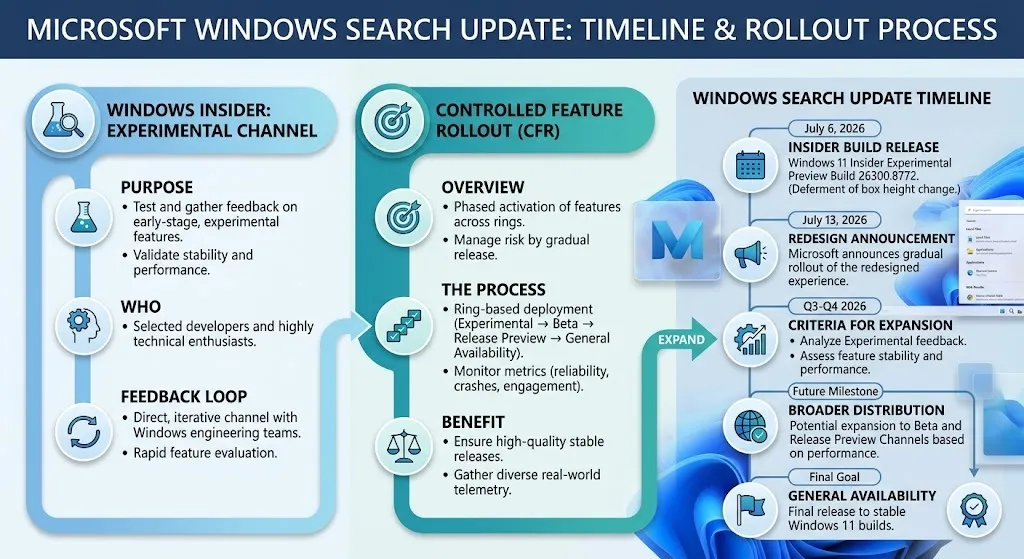
Microsoft is releasing the update through a Controlled Feature Rollout (CFR).

Instead of making new features available to every Insider at once, Microsoft gradually enables them for eligible devices while monitoring feedback and reliability. This staged approach allows the company to identify potential issues before expanding availability.

As a result, two PCs running the same Insider build may not receive the updated Search experience simultaneously.

Note: A Controlled Feature Rollout does not indicate when the feature will become available in the stable version of Windows 11.

Technical Details

The current rollout is associated with the following release:

ItemDetails
ProductWindows Search Box
Operating SystemWindows 11
DistributionControlled Feature Rollout (CFR)
Initial AvailabilityWindows Insider Experimental Channel
Insider BuildWindows 11 Insider Experimental Preview Build 26300.8772

Microsoft has also confirmed that a previously planned change to the Search box height has been postponed to a future Insider release.

Windows Search rollout infographic.
The Search improvements are rolling out gradually through Microsoft's Controlled Feature Rollout.

Timeline

DateEvent
July 6, 2026Windows 11 Insider Experimental Preview Build 26300.8772 released
July 13, 2026

Microsoft announced the redesigned Windows Search

experience and began its gradual rollout

Why This Matters

The update represents a subtle but meaningful shift in how Microsoft views Windows Search.

For years, Search evolved beyond a local launcher into a gateway for web content. The latest changes move the experience back toward helping users quickly reach the files, apps, and settings already on their devices.

Giving users control over web and Microsoft Store suggestions is another notable step. Rather than forcing a single experience, Microsoft now lets users decide how much online content should be integrated into Search.

For users who rely on the taskbar throughout the day, those changes could make routine interactions faster and more predictable.

What Happens Next?

At this stage, Microsoft has confirmed availability only for Windows Insiders in the Experimental channel.

The company has not announced:

  • A release date for the stable version of Windows 11
  • Which future Windows releases will include the redesigned Search experience by default
  • Whether additional Search enhancements are planned beyond the current rollout

As with other Insider features, broader availability will depend on testing results and user feedback.

Conclusion

The latest Windows Search update focuses on refining one of the operating system’s most frequently used features rather than reinventing it. By prioritizing local content, removing promotional elements from web results, and introducing more user control, Microsoft is addressing long-standing feedback from users who depend on Search as a productivity tool.

For now, the redesign is limited to Windows Insiders in the Experimental channel. The next milestone will be whether the improvements expand to additional Insider channels and, eventually, to the stable release of Windows 11.

Frequently Asked Questions

1. Who can use the new Windows Search experience?

The update is currently rolling out gradually to Windows Insiders in the Experimental channel through Controlled Feature Rollout.

2. Does the update remove web search completely?

No. Microsoft has removed promotional content from web results and added controls that let users choose whether web and Microsoft Store suggestions appear.

3. Where can I manage Search suggestions?

The controls are available in Settings → Privacy & Security → Search.

4. What is the biggest improvement?

The redesigned Search experience gives greater priority to local apps, files, and settings when they are the most relevant results.

5. Does Search recognize misspelled app names?

Yes. Microsoft says the update improves typo tolerance for application searches.

6. Has file searching changed?

Yes. Search now offers better discovery of local and connected files, including support for two-character searches.

7. Is this available in the stable version of Windows 11?

Microsoft has not announced a release date for the stable rollout.

8. What is Controlled Feature Rollout?

It is Microsoft’s staged deployment process that gradually enables new features for eligible devices instead of releasing them to everyone at once.

9. Are there any security changes included?

No security updates related to the redesigned Search experience have been announced.

10. Were any planned features delayed?

Yes. Microsoft says a planned change to the Search box height has been deferred to a future Insider release.

0 Comments

Related Articles

Comments (0)

Share your thoughts

Your email address will not be published. Required fields are marked *