Laptop Processor Names Explained: Intel Core, Ryzen and Apple Silicon
You’re looking at a laptop listing that says “Intel Core Ultra 5 228V” or “AMD Ryzen AI 7 350” or “Apple M5 Pro”. What […]
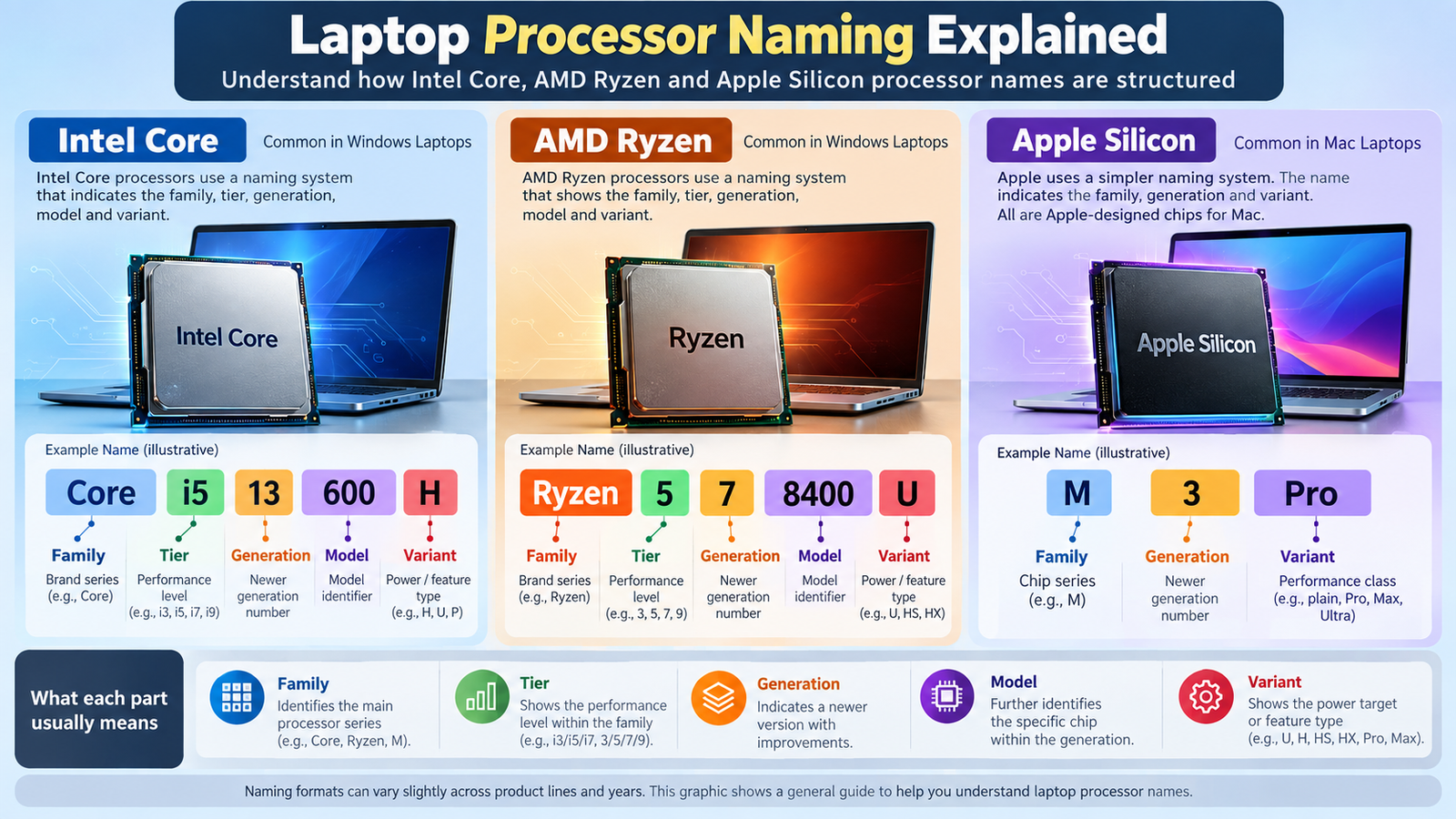
You’re looking at a laptop listing that says “Intel Core Ultra 5 228V” or “AMD Ryzen AI 7 350” or “Apple M5 Pro”. What does that actually tell you?
Quite a lot, as it turns out. A processor name holds clues about the brand, the product family, the tier, and often the generation and the kind of laptop the chip was designed for. It does not tell you how fast the laptop will feel. This guide is laptop processor names explained for beginners: what each part means, what each company’s system looks like today, and how to avoid the classic mistake of judging a chip by one number.
One caution before we start. Naming systems change. Everything below describes the conventions in use as of September 2026, and we flag which rules apply only to specific families.
Quick Answer: How to Read a Laptop Processor Name
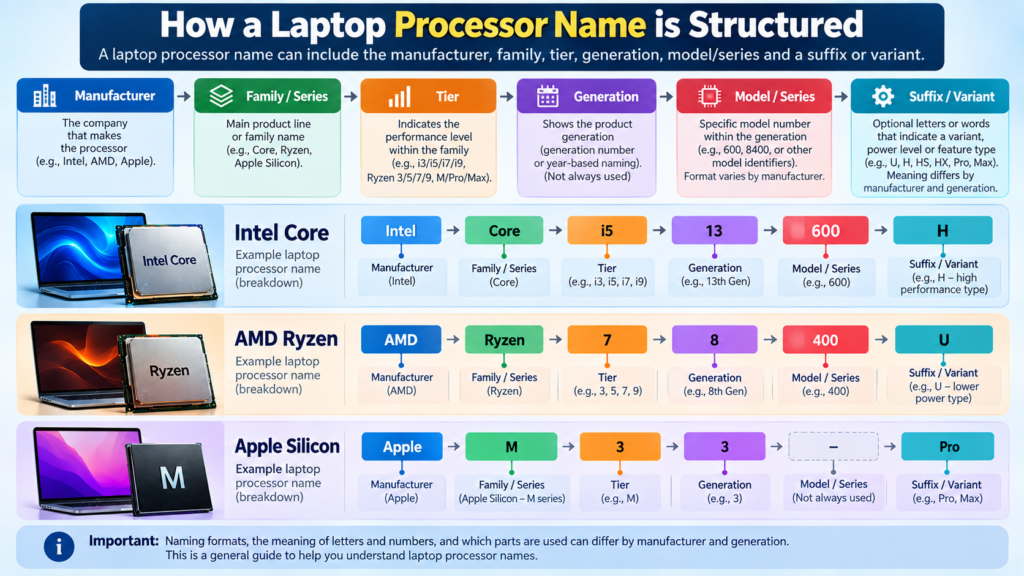
Most names can be read in this order:
Brand → Processor family → Tier → Model / series information → Suffix / variant
- Brand: who made it (Intel, AMD, Apple).
- Processor family: the product line, such as Core Ultra, Ryzen, or M-series.
- Tier: a label such as 5, 7 or 9 (or Pro/Max for Apple) that positions the chip within its family.
- Model / series information: digits identifying the exact chip and, in some families, when it launched.
- Suffix / variant: letters (or extra words) hinting at the power class or design.
The order is a mental model, not a universal law. Each company fills these slots differently, and the meaning of a letter or digit can change between generations.
Key terms:
- CPU: the main processor that executes instructions and handles many of a computer’s tasks.
- Processor family: a group of processors sharing a product line name.
- Model: the specific processor within a family.
- Generation: a label some families use to separate newer product batches from older ones.
- Suffix: letters that can indicate characteristics, and they mean different things depending on the maker and family.
Why Laptop Processor Names Are Confusing
- Each company uses its own system. Intel’s digits, AMD’s digits and Apple’s “M” numbers are not interchangeable.
- The same number doesn’t mean the same performance across brands. A “5” from one company is not a “5” from another.
- A higher tier number doesn’t always mean a newer processor. Some names are refreshes of older designs (more on this below).
- One model number can pack in several facts. Year, tier, architecture and power class can all hide in a few characters.
- Naming schemes get replaced. Intel dropped the “i” from Core i5 and Core i7 in its recent families. AMD changed how its laptop numbers work in 2023. Rules you read in an older guide may not apply to a new laptop.
How Intel Core Processor Names Work
Intel currently sells laptop chips under several names, so first work out which family you’re looking at.
Core Ultra is Intel’s premium family. Intel describes Core Ultra as its premium family, with neural processing units (NPUs) and, on some models, Arc graphics. Names include a tier (5, 7 or 9), and Intel’s documentation also mentions x7 and x9 tiers. In Core Ultra, the first digit of the number identifies the generation, labelled Series 1, Series 2, Series 3 and so on. IntelIntel
Core (without “Ultra”) is the more accessible family. Intel says these chips use a shorter naming scheme with a three-digit number and come in Core 3, Core 5 and Core 7 tiers. Intel
Other families exist. The “Intel Processor” family, aimed at value laptops, has no generation indicator in its number. Its names start with an N or U. Intel
Older laptops used the Core i3/i5/i7/i9 system with a generation number at the front (Intel’s support pages list generations from the 4th to the 14th). If you’re buying used or discounted stock, you may meet these names. Treat them as a separate, older scheme.
Reading a real Intel name
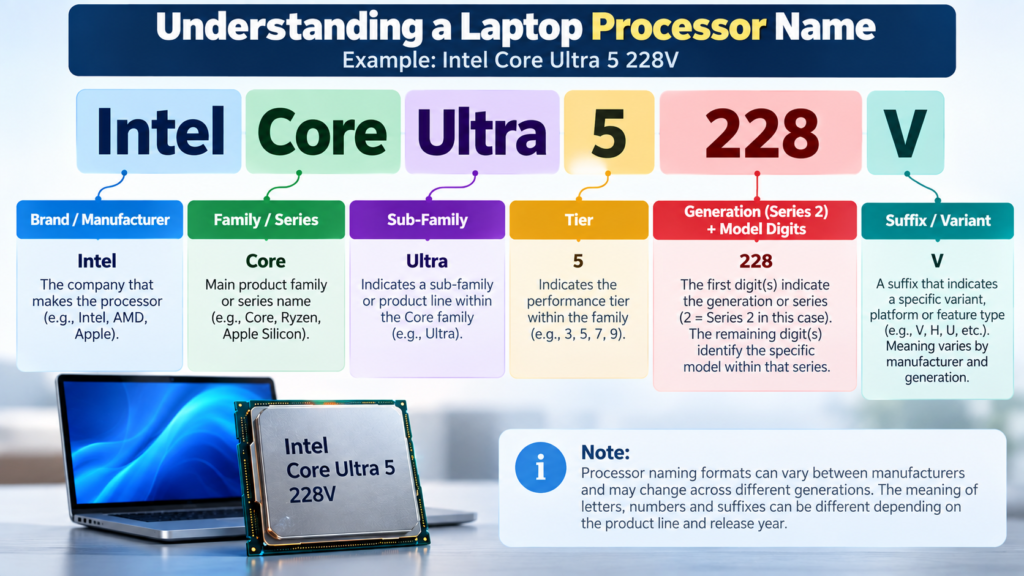
Using an example from Intel’s own documentation, Intel Core Ultra 5 228V:
| Part | Meaning |
|---|---|
| Intel | Brand |
| Core Ultra | Premium family |
| 5 | Performance tier |
| 2 | Generation indicator (Series 2) |
| 28 | Model / SKU digits |
| V | Suffix (see below) |
Intel’s own examples include the Core Ultra 7 165H (Series 1) and the Core Ultra 5 228V (Series 2). Intel
The SKU digits (like “28”) only make sense within the same family and generation. Comparing 228V with a 165H by digits alone tells you little.
Intel Core 3, Core 5, Core 7 and Core 9
These numbers are tier labels. They position a chip within a family, roughly from entry to premium. They are product positioning, not measurements.
- A Core 7 and a Core Ultra 7 are different families, so the same number doesn’t make them equal.
- Core Ultra 9 sits above Core Ultra 7 in the same lineup, but that doesn’t make every Core Ultra 9 faster than every Core Ultra 7 across generations and power classes.
- The tier doesn’t reveal core counts, power limits, or the laptop’s cooling.
So use the tier as a starting clue, then look up the exact model.
What Do Intel Processor Letters Mean?
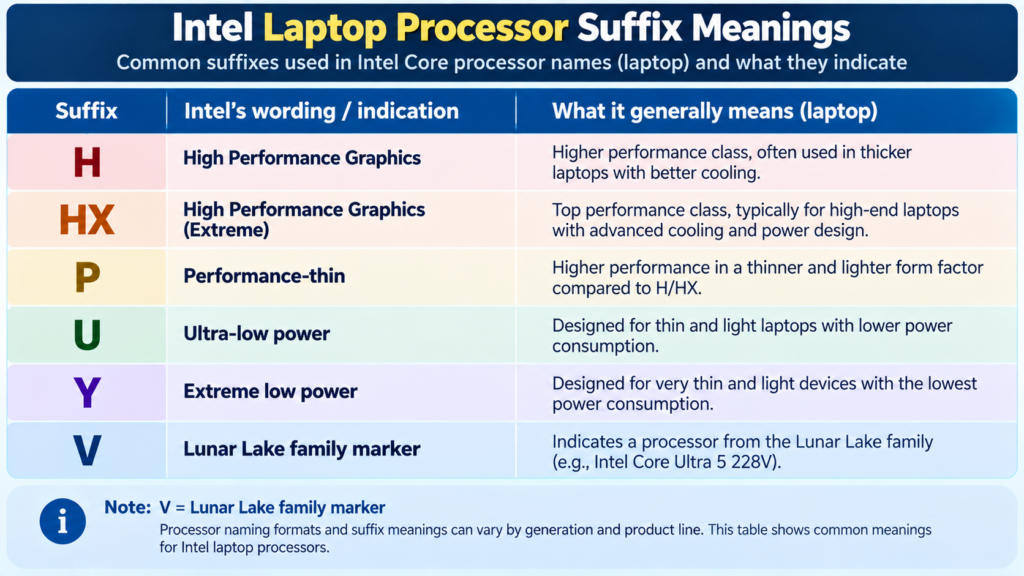
Letters at the end of an Intel name describe the design target. Intel’s suffix table says H means high performance optimized for mobile, U means mobile power efficient, P means performance optimized for thin and light laptops, Y means extremely low power, and V means Lunar Lake. Intel also lists HX as highest performance with all models unlocked. IntelIntel
Laptop-relevant suffixes you’re likely to meet:
| Suffix | What Intel says it represents | Applies to |
|---|---|---|
| H | High performance optimized for mobile | Laptop chips in Intel’s Core Ultra and Core families |
| HX | Highest performance, unlocked | Laptop chips, higher-power designs |
| P | Performance optimized for thin-and-light laptops | Laptop chips |
| U | Mobile power efficient | Laptop chips |
| Y | Extremely low power | Laptop chips |
| V | Lunar Lake | Core Ultra Series 2 (e.g. 228V) |
Two cautions:
- “V” is not a general “low power” letter. Intel defines it as the Lunar Lake family, so it’s a family marker, not an efficiency scale.
- Some newer laptop chips have no suffix at all. One secondary source says many Series 3 mobile models are suffix-free, but that is Needs Editorial Verification against Intel’s documentation.
Letters like K and F apply to desktop chips, so you won’t see them in laptops.
How AMD Ryzen Processor Names Work
AMD’s laptop names have changed more than once, so it matters which era you’re reading.
The 2023–2025 four-digit scheme (Ryzen 7000, 8000, 9000-era laptop chips)
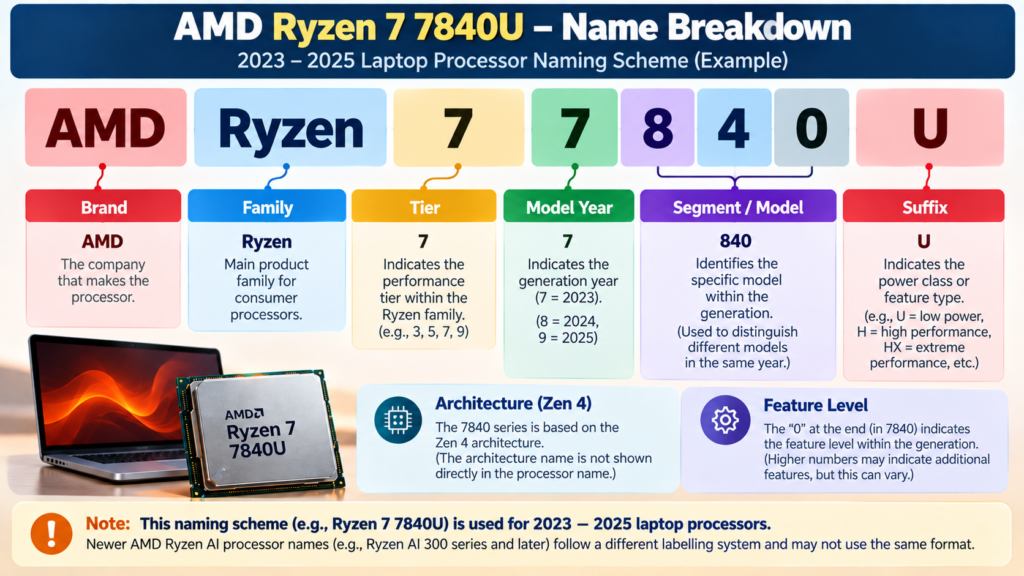
AMD’s mobile decoder for this period assigns the first digit to the model year (7 = 2023, 8 = 2024, 9 = 2025), the second digit to the market segment, the third digit to the Zen architecture, and the fourth digit to a lower (0) or higher (5) segment. The suffix signals the power class. anandtech
The third digit is the one buyers most often miss. Take two chips that both look like “Ryzen 7 7000-series”: the Ryzen 7 7735U is Zen 3+, the 7730U is Zen 3, and the 7840U is Zen 4. They share a “7” first digit, but that only tells you the model year, not the architecture. RottenWiFi
Reading Ryzen 7 7840U (a historical example):
| Part | Meaning under this scheme |
|---|---|
| Ryzen 7 | Tier |
| 7 | Model year 2023 |
| 8 | Market segment (an “8” can be Ryzen 7 or 9) |
| 4 | Zen 4 architecture |
| 0 | Lower of the two feature segments |
| U | Power class |
The Ryzen AI names (newer laptop families)
Newer laptop chips use names like Ryzen AI 7 350. AMD’s laptop range now includes Ryzen AI 300 and, since 2026, Ryzen AI 400 families. Notebookcheck’s analysis found the Ryzen AI 400 “Gorgon Point” chips use the same Zen 5 cores and RDNA 3.5 graphics as last year’s Ryzen AI 300 chips, with small clock and NPU improvements. That’s a good reminder that a new series number does not guarantee a new core design. notebookcheck
How to read the digits in Ryzen AI names is Needs Editorial Verification. I could not confirm an official AMD decoder for the Ryzen AI 300/400 numbers, so this article does not interpret them digit by digit. Editors should add that from AMD’s documentation if one is available.
What Do Ryzen 3, Ryzen 5, Ryzen 7 and Ryzen 9 Mean?
These are AMD’s tiers, running from everyday computing up to enthusiast and high-end use. As with Intel, they position a chip within a family. They are not scores.
- Ryzen 5 is not automatically equivalent to Core 5.
- Ryzen 7 is not automatically equivalent to Core 7.
- The exact generation, architecture, model, power class and the laptop it sits in all matter.
For a real comparison of the two families, see our guide on [Intel Core vs AMD Ryzen] (internal link).
What Do AMD Ryzen Letters Mean?
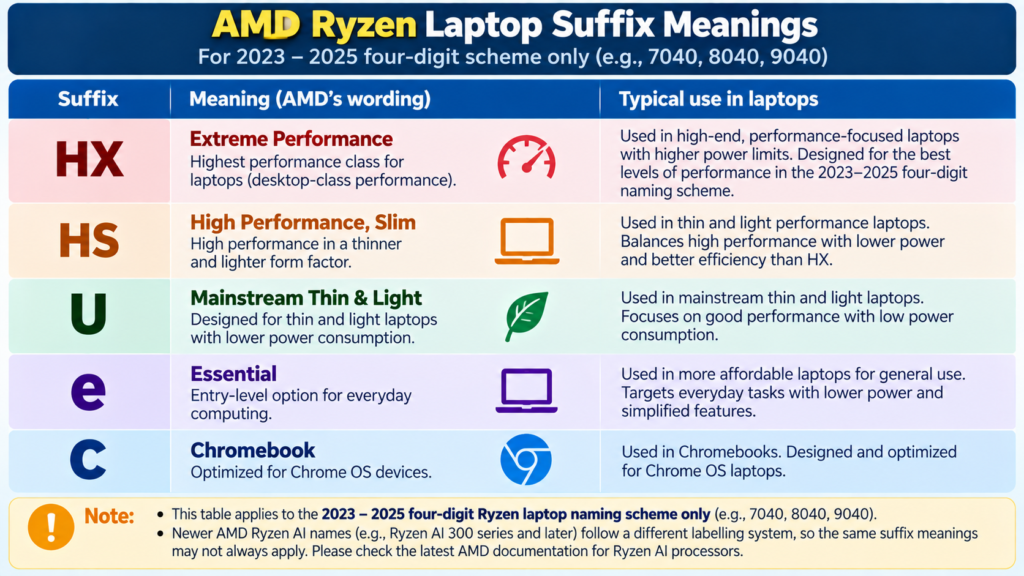
Under the 2023–2025 four-digit scheme, the suffix HX means 55 W or more, HS means 35 W, U means 15–28 W, “e” means 9 W, and C marks Chromebook chips. Two cautions: anandtech
- These wattage figures are typical power classes for that scheme, and the laptop maker decides the actual sustained power and cooling.
- Ryzen AI names use their own labelling. The letters and meanings in newer names (for example HX or PRO variants) are Needs Editorial Verification.
How Apple Silicon Names Work
Apple’s chips work differently from Intel’s and AMD’s naming. Apple calls its own processors Apple silicon, and each one is a system on a chip (SoC). Apple’s description of the M5 Pro and M5 Max is a single SoC combining the CPU, scalable GPU, media engine, unified memory controller, Neural Engine and Thunderbolt 5 capabilities. So the name identifies the whole chip package, not only the CPU cores. Apple
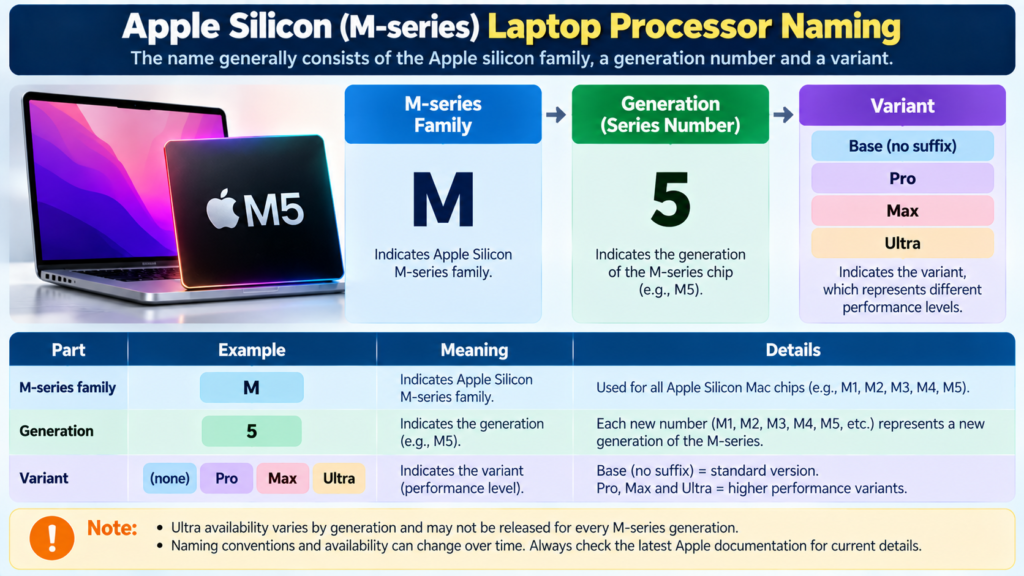
The name pattern is: M + generation number + optional tier.
- M5 is the base chip of that generation. The M5 MacBook Pro first arrived in October (2025) as a 14-inch model. 9to5Mac
- Pro and Max are higher tiers built on the same generation.
- Ultra is a further tier that Apple has used for desktop Macs. Whether an M5-generation Ultra exists is Needs Editorial Verification.
What Do M1, M2, M3, M4 and Newer Numbers Mean?
The number is the generation of Apple’s M-series chips. Higher numbers generally mean newer. But:
- A generation number doesn’t tell you the performance of every configuration. Apple sells the same chip name with different core counts. A 14-inch MacBook Pro’s M5 Pro can have 15 or 18 CPU cores and 16 or 20 GPU cores. Engadget
- Pro, Max and (where offered) Ultra are different product tiers, not just marketing polish. M5 Pro and M5 Max have an 18-core CPU, up from 14 and 16 cores in M4 Pro and M4 Max. TechCrunch
Always check the exact chip configuration on Apple’s spec page for the specific Mac.
What Do Apple Pro, Max and Ultra Mean?
They’re Apple’s tiers within its own silicon lineup. Don’t translate them into Intel Core or AMD Ryzen tiers. Claims like “M-series Max equals Core i9” or “M-series Pro equals Ryzen 7” don’t hold up, because the chips are built and named differently. If you ever see a comparison, look for independent testing that names both exact chips and the workload.
Intel vs AMD vs Apple: How the Naming Systems Differ
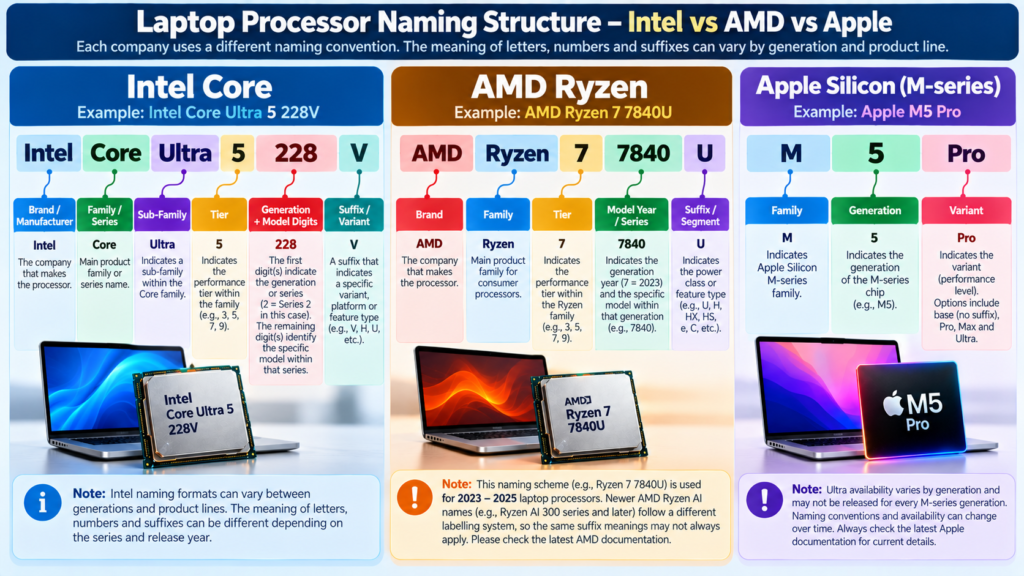
| Manufacturer | Example naming concept | What the name can tell you | What it cannot tell you alone |
|---|---|---|---|
| Intel | Core / Core Ultra + tier + model digits + suffix | Family, tier, generation (in Core Ultra), power-class clues | Exact real-world performance |
| AMD | Ryzen (or Ryzen AI) + tier + model digits + suffix | Family, tier, and (in the 2023–2025 scheme) model year, architecture and power class | Exact real-world performance |
| Apple | M + generation + tier | Generation and product tier | Exact configuration and real-world performance |
No winner here. The point is that three companies use three different approaches, so you shouldn’t assume the same tier number or letter means the same thing.
Once you know what a name means, you may want to compare the actual families. Our [Intel Core vs AMD Ryzen] guide covers that.
Does a Higher Number Mean Better Performance?
Not reliably. Think of the number as a label on a product shelf, not a speedometer. Reasons:
- Newer lower-tier vs older higher-tier. A newer Core 5 or Ryzen 5 class chip can be a different design from an older Core 7 or Ryzen 7 class chip. Tier tells you position within a lineup, not cross-generation ranking.
- Refreshes. As noted above, Ryzen AI 400 laptop chips reuse the Zen 5 and RDNA 3.5 designs of the previous Ryzen AI 300 generation. A higher series number doesn’t automatically mean a new architecture. notebookcheck
- Same number, different design. The 7730U and 7840U share a “7” but use different Zen architectures.
- Different power classes. A chip built for thin, efficient laptops and one built for high-power laptops are designed for different jobs.
- Different cooling. The same chip can behave differently in a thin laptop and a thick gaming laptop.
- Different core and thread configurations. Two chips with the same tier can have different core counts.
So compare exact processors on their spec pages and independent reviews, not just their numbers.
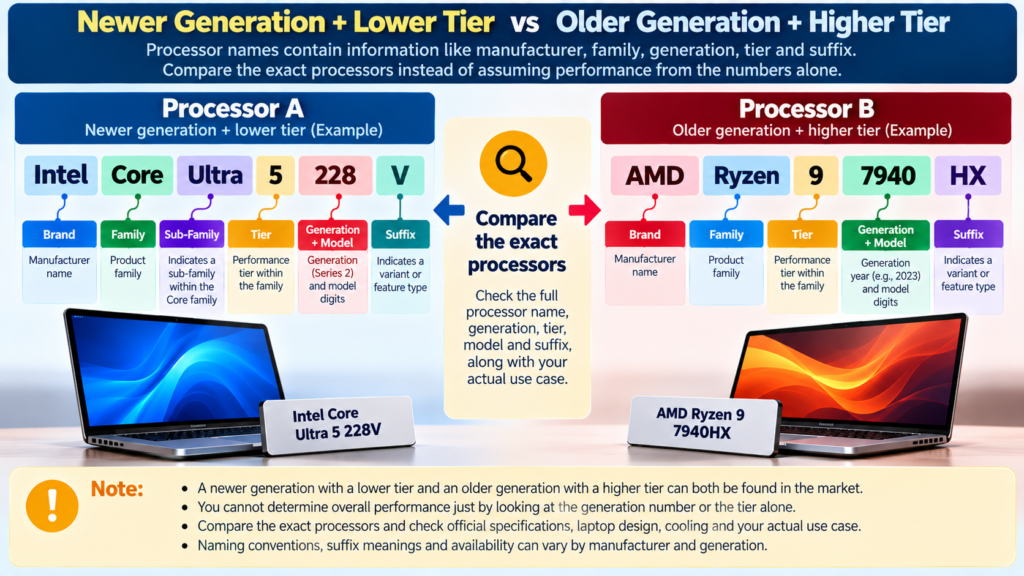
How to Read a Laptop Processor Specification
Work through it in order:
- Identify the manufacturer. Intel, AMD, Apple (or another maker).
- Identify the processor family. Core Ultra, Core, Ryzen, Ryzen AI, M-series.
- Identify the tier. 3, 5, 7, 9 (or base, Pro, Max).
- Identify the exact model. Write down the full name, including digits.
- Check generation or series information. Series 1/2/3 for Core Ultra, the model-year digit in older Ryzen names, the M generation for Apple.
- Check the suffix or product class. H, U, V, HX and so on, keeping in mind each family’s own meanings.
- Check the full CPU specification. Use the manufacturer’s spec page for core and thread counts, power range and integrated graphics.
- Check the rest of the laptop. The chip is one part of a system.
Then compare the laptop’s RAM, storage, GPU, display, cooling, battery and price. Our guide on [how to choose a laptop] (internal link) walks through the whole decision.
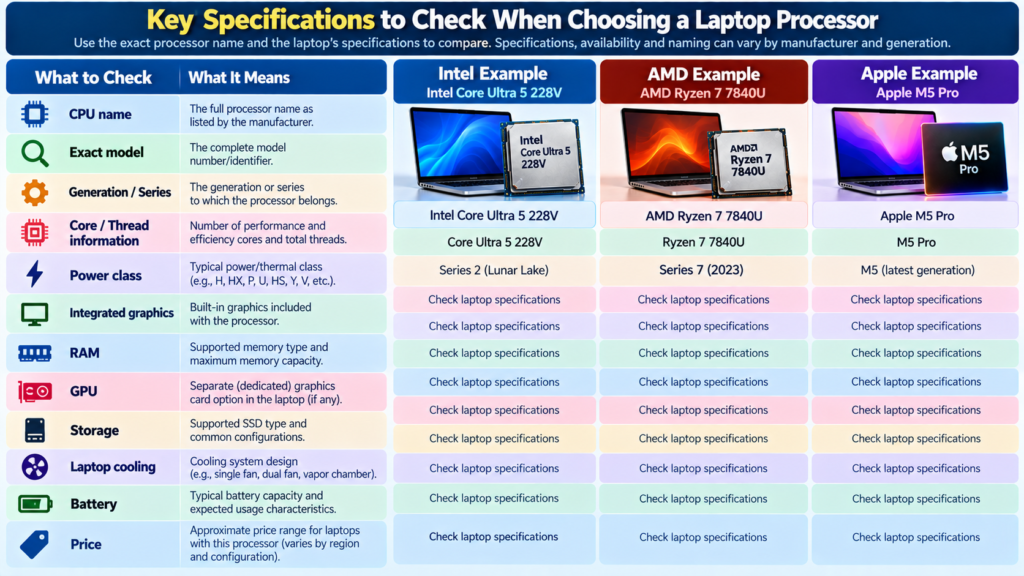
CPU Model Number vs Performance
A model number is an identification tool, not a performance score. That is why these comparisons can mislead when made on the name alone:
- Core 5 vs Ryzen 5
- Core 7 vs Ryzen 7
- Ryzen 7 vs Core 9
- An M-series chip vs a Core i7
Before comparing, check generation, architecture, core and thread configuration, power class, integrated graphics, the workload you care about, the laptop’s cooling, and how the manufacturer configured the machine.
Processor Names and Gaming
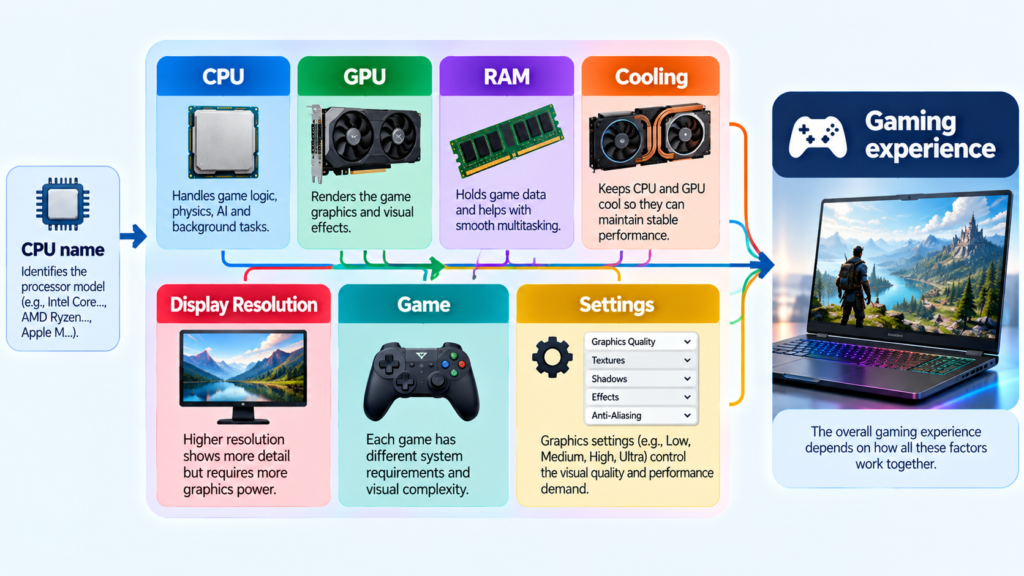
A CPU name tells you what processor you have. It does not tell you your gaming experience.
CPU name → tells you what processor you have.
CPU + GPU + RAM + cooling + game settings → determine the actual gaming experience.
Gaming performance also depends on whether the laptop has a dedicated or integrated GPU, the display resolution, and the specific game. Graphics memory is its own question, covered in [how much GPU memory your laptop needs].
Common Mistakes When Reading CPU Names
Mistake 1: Comparing only Core 5 vs Ryzen 5. The tiers are labels within separate families, so this comparison ignores generation, architecture and power class.
Mistake 2: Assuming a higher number is always newer. Model-year digits, series numbers and refreshes mean a bigger number can hide an older or unchanged design.
Mistake 3: Ignoring suffixes or series. An efficient U-class chip and a high-power H or HX chip can share a tier but suit different laptops.
Mistake 4: Ignoring the laptop itself. Cooling, power limits and manufacturer configuration change how a chip behaves.
Mistake 5: Looking only at the CPU. RAM, GPU, storage, display and battery shape everyday experience as much as the processor.
Mistake 6: Assuming Apple names map directly to Intel or AMD tiers. Apple’s chips are complete SoCs with their own tiers, so there is no clean one-to-one equivalence.
Practical Examples
These come from official pages or manufacturer documentation. Each one is labelled with its generation so you don’t apply its rules to newer families.
Processor name: Intel Core Ultra 5 228V (Series 2)
What the parts mean: Core Ultra = premium family; 5 = tier; 2 = Series 2; 28 = model digits; V = Lunar Lake.
What it tells you: The family, the tier, the generation and the chip family.
What it does NOT tell you: Real-world speed, battery life, or how it compares to a Ryzen or Apple chip.
Processor name: Intel Core Ultra 7 165H (Series 1)
What the parts mean: Core Ultra, tier 7, Series 1, model digits 65, H = high performance optimized for mobile.
What it tells you: It is a higher-power laptop design from the first Core Ultra series.
What it does NOT tell you: How it compares with a Series 2 or Series 3 chip of the same tier.
Processor name: AMD Ryzen 7 7840U (historical, 2023 scheme)
What the parts mean: Ryzen 7 tier; 7 = 2023 model year; 8 = segment; 4 = Zen 4; 0 = lower feature segment; U = 15–28 W class.
What it tells you: Year, architecture and power class.
What it does NOT tell you: Its speed in a specific laptop, or how it relates to newer Ryzen AI names.
Processor name: Apple M5 Pro
What the parts mean: M-series, generation 5, Pro tier.
What it tells you: Generation and product tier. Apple announced it in March 2026 alongside M5 Max for the new 14- and 16-inch MacBook Pro.
What it does NOT tell you: The exact core counts (which vary by configuration) or how it compares with any Intel or AMD chip. Apple
Not used as a decoded example: Ryzen AI 7 350 and any Intel Core (non-Ultra) three-digit model. AMD’s own page confirms the Ryzen AI 7 350 exists, but the digit meaning is Needs Editorial Verification. Intel confirms Core uses a three-digit number, but a specific verified example was not gathered.
FAQ
What do the numbers in a laptop processor name mean?
It depends on the family. They can indicate a tier (3, 5, 7, 9), a generation or model year, and a specific model. Check the maker’s naming guide for that exact family.
Is Core 5 better than Ryzen 5?
You can’t tell from the names. They are tiers in different families. Compare the exact processors and how they perform in the tasks you care about.
Is Ryzen 7 better than Core 7?
Same answer: it depends on the exact chips, their generation, and the laptop.
Does a higher processor number mean better performance?
Not reliably. Tier, series, refreshes, power class and cooling all change the picture.
What does the generation number mean?
It marks when a chip belongs in a family’s timeline. For Intel Core Ultra, the first digit of the number identifies the series. For Apple, it’s the M number. In AMD’s 2023–2025 laptop scheme, the first digit is a model year, not a Zen version.
What do Intel and AMD processor letters mean?
Usually the design target or power class (for example H, U, HX). Meanings differ by family, so check the current documentation for your chip.
What does M-series mean on an Apple laptop?
It’s Apple’s own family of processors, and each is a system on a chip. The number is the generation, and words like Pro and Max mark higher tiers.
Is Apple Silicon the same as Intel or AMD?
No. It’s a different family with a different naming approach, and its tiers don’t map directly onto Intel or AMD tiers.
How can I compare two laptop processors?
Use the step-by-step method above: identify the exact models, check their spec pages for generation, cores and power class, then read independent reviews of the actual laptops.

Related Articles
Intel Core vs AMD Ryzen: Which Processor Is Right for You?
Shopping for a new laptop almost always comes down to one early decision: Intel or AMD? The processor badge on the lid feels like […]
NVMe SSD vs SATA SSD: Speed, Performance and Real-World Differences
If you’ve shopped for a laptop or PC upgrade recently, you’ve probably seen “NVMe SSD” and “SATA SSD” listed as if they’re two flavors […]
SSD vs HDD: What’s the Difference and Which Should You Choose?
If you’ve ever shopped for a laptop or tried to speed up an old PC, you’ve probably run into the terms SSD and HDD. […]
Comments (0)