Acer ODK360 7-in-1 USB-C Hub: A Practical Way to Expand USB-C Connectivity
A detailed look at the Acer ODK360 7-in-1 USB-C Hub, covering specifications, compatibility, supported platforms and key buying considerations.
Contributor

Executive Summary
As laptops continue to shed built-in ports in favor of slimmer designs, USB-C hubs have become an everyday accessory rather than an optional extra. Acer’s ODK360 7-in-1 USB-C Hub is built to restore many of the connections that have disappeared from modern notebooks, adding video output, USB expansion, memory card readers and USB Power Delivery passthrough through a single USB-C connection.
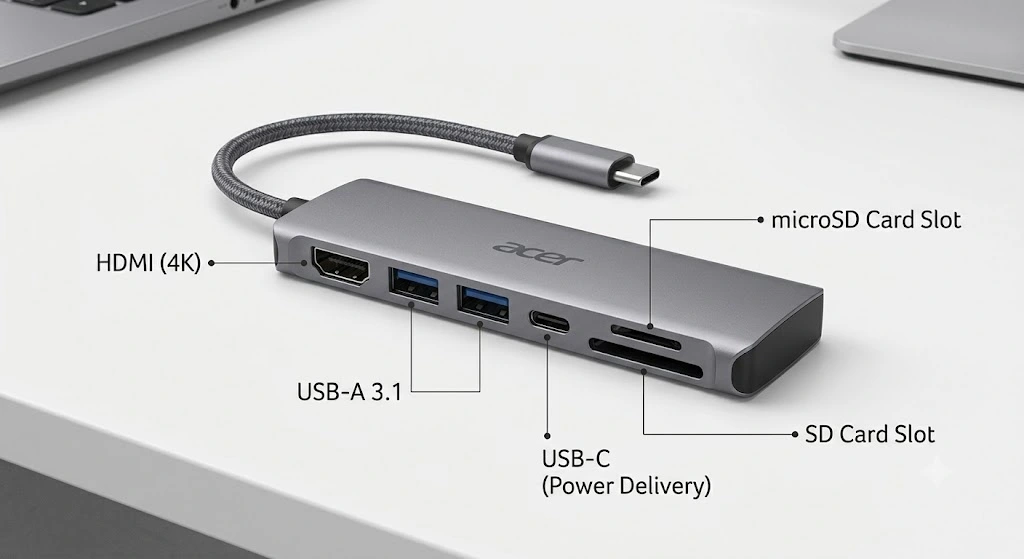
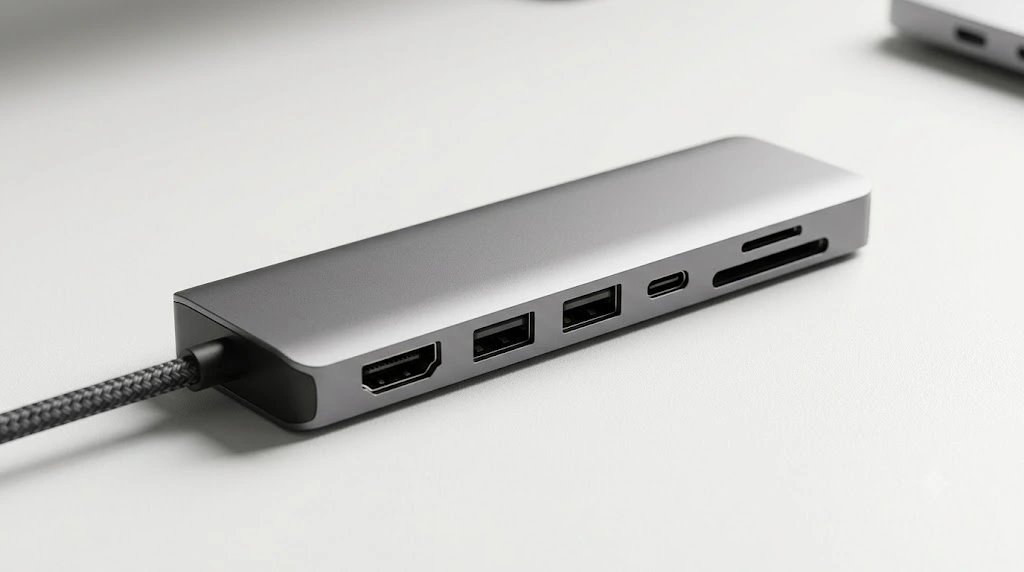
Official Acer documentation lists a 4K HDMI output, two USB-A 3.1 Gen 1 ports, one USB-C 3.1 Gen 1 data port, SD and microSD card readers, and USB Power Delivery support. While it isn’t intended to replace a full desktop docking station, it offers a compact way to expand connectivity for everyday work.
What Does the Acer ODK360 7-in-1 USB-C Hub Offer?
USB-C has become the standard connector across laptops, tablets and many smartphones. The trade-off is that many devices now ship with only one or two USB-C ports, leaving users dependent on adapters for displays, storage devices and older USB peripherals.
The Acer ODK360 brings together several commonly used connections in a single compact hub:
- HDMI output for an external display
- Two USB-A ports for existing peripherals
- One USB-C data port
- SD card reader
- microSD card reader
- USB-C Power Delivery passthrough
For many users, that means replacing a collection of separate adapters with a single accessory.
Technical Specifications
| Specification | Details |
|---|---|
| Model | Acer ODK360 |
| Part Number | GP.DCK11.02A |
| HDMI Output | Up to 4K at 30Hz |
| USB-A Ports | 2 × USB 3.1 Gen 1 |
| USB-C Data Port | 1 × USB 3.1 Gen 1 |
| Data Speed | Up to 5Gbps |
| SD Card Slot | Yes |
| microSD Slot | Yes |
| USB Power Delivery | Up to 100W input according to Acer user manual |
| Weight | 99g |

Which Devices Are Supported?
Acer lists support for the following platforms:
- Windows 11
- Windows 10
- Windows 8.1
- Windows 8
- Windows 7
- macOS
- Linux
- Android
- iPadOS
Compatibility across desktop and mobile operating systems makes the hub suitable for a broad range of devices, provided they include a compatible USB-C connection.
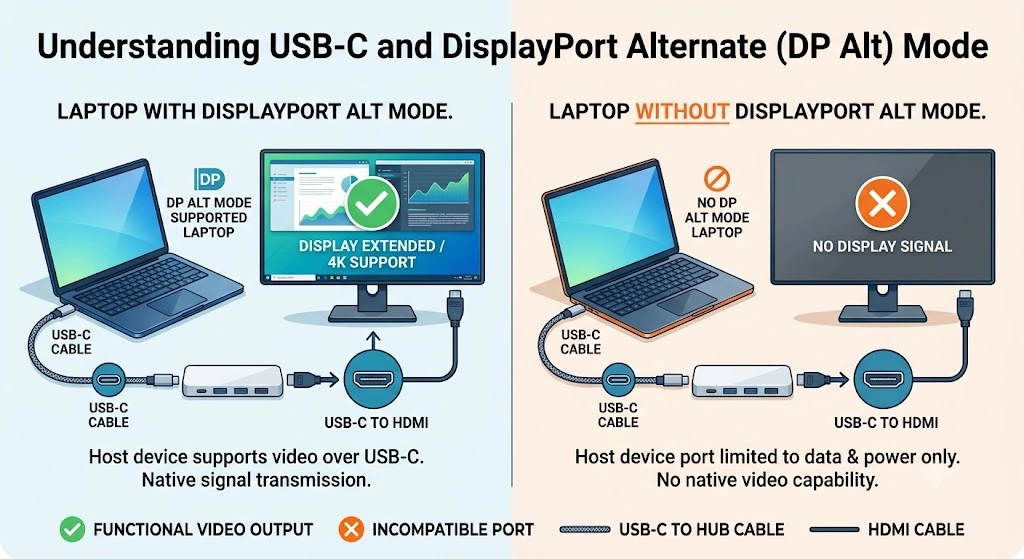
Important: HDMI output requires the host USB-C port to support DisplayPort Alternate Mode (DP Alt Mode). A USB-C connector by itself does not guarantee video output.
Why DisplayPort Alternate Mode Matters
One of the most common points of confusion with USB-C accessories is DisplayPort Alternate Mode, or DP Alt Mode.
Although USB-C looks the same across devices, not every USB-C port supports the same capabilities. Some carry video signals, while others are limited to charging and data transfer.
If your laptop or tablet doesn’t support DP Alt Mode:
- The HDMI output will not work.
- USB ports and memory card readers may continue to function normally.
Checking your device’s specifications before buying a USB-C hub can help avoid compatibility surprises.

Everyday Uses
The ODK360 is designed to restore the ports many users rely on every day.
Typical scenarios include:
- Connecting an external monitor
- Using a wired mouse and keyboard
- Accessing USB flash drives
- Importing photos from SD or microSD cards
- Charging a laptop through the hub while other devices remain connected
These are common workflows for students, remote workers and office users who need additional connectivity without carrying multiple adapters.
How It Compares With a Desktop Dock
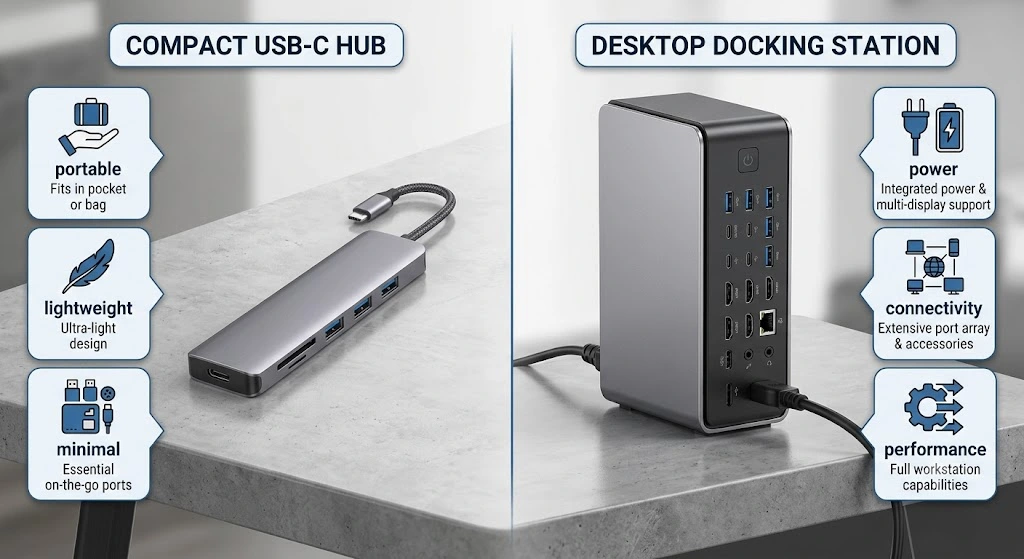
USB-C hubs and docking stations serve similar purposes, but they’re designed for different types of users.
| USB-C Hub | Desktop Dock |
|---|---|
| Compact and portable | Larger desktop accessory |
| Basic port expansion | Extensive connectivity |
| Typically focused on a single external display | Often supports multiple displays |
| USB speeds up to 5Gbps on this model | Higher-speed options depending on the dock |
| Easy to carry | Designed for permanent desk setups |
If your primary goal is adding a few essential ports while travelling or working away from your desk, a compact hub is often the more practical choice.

Why This Matters
Laptop manufacturers have steadily reduced the number of built-in ports as devices have become thinner and lighter. That design shift has made external accessories increasingly important for everyday tasks.
Whether it’s connecting a projector, plugging in older USB peripherals, importing photos from a camera or adding a second display, a USB-C hub restores functions that many users previously took for granted.
The ODK360 is one example of how manufacturers are addressing that change without requiring users to invest in a larger desktop docking solution.
Buying Considerations
Before choosing any USB-C hub, it’s worth checking a few details about your device.
Confirm Video Output Support
If you plan to use an external monitor, make sure your USB-C port supports DisplayPort Alternate Mode.
Match the Hub to Your Workflow
The ODK360 supports USB 3.1 Gen 1 transfer speeds of up to 5Gbps. That is suitable for everyday peripherals and storage devices, though users working with very large files may prefer faster alternatives.
Consider Wired Networking
The hub does not include an Ethernet (RJ45) port. If a wired network connection is essential, you’ll need either a separate adapter or a more feature-rich docking station.
Note: Acer documentation contains a discrepancy regarding USB Power Delivery. The official user manual specifies support for up to 100W USB Power Delivery input, while one Acer retail listing references 90W. Acer has not published clarification, so buyers who require maximum charging capability should verify the current specification before purchasing.
Availability
The Acer ODK360 is available through Acer retail channels and other retailers.
An official Acer retail listing in Brazil shows a list price of R$399.00. Pricing may vary by country, retailer and promotional offers.
Conclusion
The Acer ODK360 7-in-1 USB-C Hub focuses on solving a familiar problem: expanding the limited connectivity found on many modern laptops. Official documentation confirms support for HDMI output, USB expansion, memory card readers and USB Power Delivery in a compact, lightweight design compatible with multiple operating systems.
Before purchasing, it’s worth confirming that your device supports DisplayPort Alternate Mode if external display support is important, and keeping in mind the differing USB Power Delivery figures published across Acer’s documentation. For users who simply need more everyday connectivity without moving to a full desktop dock, the ODK360 offers a straightforward solution.
Frequently Asked Questions
1. What ports are included on the Acer ODK360?
The hub includes one HDMI port, two USB-A 3.1 Gen 1 ports, one USB-C 3.1 Gen 1 data port, an SD card reader and a microSD card reader.
2. Does the HDMI port support 4K displays?
Yes. Acer documentation specifies support for resolutions up to 4K at 30Hz.
3. Does the hub support USB Power Delivery?
Yes. The Acer user manual specifies support for USB Power Delivery input of up to 100W.
4. Will HDMI work on every USB-C laptop?
No. The host device must support DisplayPort Alternate Mode (DP Alt Mode) over USB-C.
5. Which operating systems are supported?
Acer lists Windows 7 through Windows 11, macOS, Linux, Android and iPadOS.
6. Does the hub include an Ethernet port?
No. The ODK360 does not feature an RJ45 Ethernet connection.
7. How fast are the USB ports?
The USB ports support USB 3.1 Gen 1 transfer speeds of up to 5Gbps.
8. Is this a Thunderbolt docking station?
No. The ODK360 is a compact USB-C hub intended for everyday connectivity rather than a full desktop docking station.
9. What is the official model number?
The official model is Acer ODK360, with part number GP.DCK11.02A.
10. Is an official release date available?
No. Acer has not published an official release date in the available documentation

Comments (0)